
Hello good people of 2015. Regina here. I want to share with you something that will hopefully be useful in the new year as you tackle some new business goals (such as: creating and selling digital products) . . . by the way, this is free.
One of the questions I get most is: “How can I create worksheets or eBooks that look professional?” or “What software do you use to make your workbooks?”
Well, I had a live webinar the other night that was a video training of how to make PDF downloads for your audience using Apple Pages ’09 (yeah–it’s so old school you have to buy a disc–but it’s so good though, and a lot of the tips will apply to the new app version of Apple Pages as well). I use the ’09 version because it has more awesome features for publishers than the new one. The recording of the webinar is available at the bottom of this post.
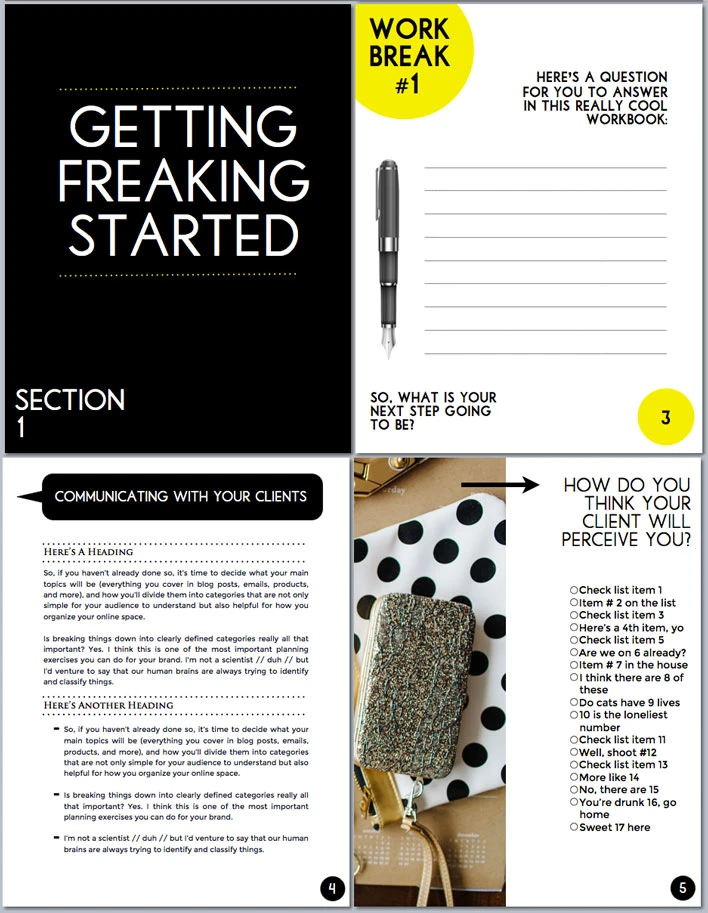
In the recording, you will receive a template (like the one above) that I will show you how to create during the webinar. We will be doing things such as:
- adding shapes and images
- discussing PDF design fundamentals
- loading your exact brand color codes into Pages
- creating sections with different headers and footers on odd + even pages (like printed books)
- adding headings, styles, and chapter/section pages
- creating a table of contents through a fancy shortcut
- exporting our documents as printable PDFs
- learning the best places to get physical books printed
- discovering great places to list your digital products for sale
- discussing ways you can present your digital products attractively
- getting a template of copyright wording for your future projects
You watch this free webinar by playing the video below:
Okay.
Regina out.


 Stephanie says
January 23, 2015 at 12:00 pmPerfect timing as always ! I was looking into Pages following your comment on our GYB Google + community saying that you had used it to do the Epic Editorial Calendar. I haven’t bought it yet so this webinar will really help me figure out if I should !
Thanks again
PS : could you come back to the G+ community? We miss you !
 regina says
January 23, 2015 at 3:31 pmStephanie, yes, I think you’ll like the mix of advanced features with simple implementation. I’ve spent a couple years getting used to it though, so I want to help demystify a few things.
And yes, coming back to the community is a brilliant idea. I apologize for my absence. I’ve finally just hired someone to help me stay on top of everything else, so I can get back to spending time in the community and creating new stuff. Thank you for still caring!
 Jay Strottman says
August 20, 2019 at 4:46 amhttps://www.dankvapes.org/
 Chaitra @ PinkPot says
January 23, 2015 at 1:48 pmThis couldn’t have come at a better time regina! You are a bundle of awesomeness. So excited to join!
xo
Chaitra
 regina says
January 23, 2015 at 3:29 pmOooh, lovely to hear that Chaitra. Thank you for taking the time to comment.
 Sara says
January 23, 2015 at 2:55 pmI definitely want to do this, as I’ve just started creating some downloadables in Pages and would love to spruce them up, but neither of the links is working for me. They just don’t load. I don’t seem to be having problems with other webpages… help? Thanks!
 regina says
January 23, 2015 at 3:28 pmSara, I’m not quite sure what’s going on because it’s letting me open the link–it goes to a public Google+ Event on my end, even when I’m not logged into Google+. Will you try one of these: (1) + (2)?
Sorry about the trouble; I wish I could see the error message you’re getting. Maybe it’s a block with Google+ on your browser?
 Melissa says
January 23, 2015 at 3:26 pmYou always come up with such fabulous and creative material. Love this idea!
 regina says
January 23, 2015 at 3:29 pmThank you so much Melissa. I appreciate that from you–Queen of Creative Materials Extraordinaire.
 Tenns says
January 23, 2015 at 3:43 pmThis is great! I’m in the process of pondering over writing an eBook. I already create digital downloads, but not in Pages. I’m very interest to see your method in doing so!
 regina says
January 25, 2015 at 12:10 amYay, would love to see a New Mama Diaries eBook. What do you use for digital downloads now?
Thank you for taking time to comment, Tenns.
 Tenns says
January 26, 2015 at 12:19 amI actually use Illustrator for all of my digital downloads and products. Its my go to for all things digital, occasionally using Photoshop when need be. 🙂
 Aneeqah says
January 23, 2015 at 10:39 pmHey Regina! <3
I've been perusing your blog for the past few hours, and I'm not going to lie, I'm really in love with everything you've created. I can't wait to start using some of your ideas, because you seem incredibly knowledgable. I've been thinking hard about where I want my blog to go- it's just not unique, and I really want to have an actual impact on people. Some of your posts will really help me with this.
But anyways, I'm loving the sound of this webinar! The outlines look gorgeous. <3 Hopefully (and I'm seriously crossing my fingers here) I'll be able to make it, although my schedule next week is pretty out of whack.
Thank you for such a lovely post and inspiring blog!
 regina says
January 25, 2015 at 12:46 amAneeqah, thank you so much for your sweet comment. This means a whole lot to me. Seriously.
I hope you’re able to make it to the webinar, but if not, I’m making sure that a recording is available afterwards.
P.S. I LOOOOVE that first quote you shared on your recent blog post. Are you on Twitter? I want to @ you in my tweet. Thank you again.
 Aneeqah says
January 25, 2015 at 5:45 pmYes, thank you so much for the recording!! That will be so helpful.
That’s so kind of you to say, Regina! <3 My Twitter handle is @MyNSRL. I can't believe I haven't put up social media icons yet since my move to WordPress! I swear the SAT took over my life for a while, ahaha. Will get them up soon.
Lots of love!! <3
 Marie says
January 24, 2015 at 4:23 amWhat an amazing post I have often wondered this myself. Really helpful . xox
http://www.rainbowsandunicornsblog.co.uk/
 regina says
January 25, 2015 at 12:08 amThank you for stopping by and taking time to comment Marie. I appreciate that.
 Rach says
January 24, 2015 at 5:35 amMassively helpful as always Regina ☺️
 regina says
January 25, 2015 at 12:08 amRach, thank you so much. And oh my goodness–this post on your site about how you learned to stop working 24/7 >> amazing.
I love your points in the video.
 Kelita says
January 24, 2015 at 3:58 pmIs there something similar for PC?
 regina says
January 24, 2015 at 11:59 pmKelita, not that I know of yet–more specifically, not that I’ve used. I know you can get it on your iPad or iPhone if you go that route, but on a PC, I’m not sure what software I’d use to get the same results. Microsoft Word can be a bit difficult for those purposes.
I love Adobe InDesign, but I feel like it takes a while to learn and it is honestly way advanced beyond what most creatives need for making an eBook. If I find any good PC options, I will come back and let you know.
 Kelita says
January 28, 2015 at 7:13 amthanks!!! Found it on the App Store for iPad and I will be diving into Adobe design…. It’s so time to graduate from Canva lol…
 Jeanette says
January 25, 2015 at 5:03 pmYou are welcome Regina. You always have something great to share and I really enjoy and learning much of your contents:)
 Shauna says
January 26, 2015 at 2:00 pmRegina I’ve missed you! You blog has been such an inspiration to me, and I have to admit you are definitely my blog crush!
Anyway, I’m working really hard to bring my blog to where I want it to be and have been trying to add printable for my readers. I don’t have the mac system, but I do have an ipad and will try to use that. I can’t wait for the webinar!
 Hansa says
January 26, 2015 at 3:38 pmHi Regina!
I just wanted to tell you that I’ve been following your blog for months and you’ve been an incredible help in the making of my new website, even though my niche is wildly different from yours.
The website is: http://TheAcuteAngle.com (If you’re feeling nerdy)
Also, you’re totally awesome.
 Manish_BHr says
January 27, 2015 at 7:09 amThank you for this post! I like all the ideas for alternate formats. I put together ebook of craft projects for the holidays and I am really thinking about how to promote our project, especially because we don’t have a huge blog following. I think you have some really good tips for that as well, thanks!
 Deryn @ Running on Real Food says
January 27, 2015 at 11:25 pmThis is awesome, lady! You are the best!!
 Courtney says
January 28, 2015 at 5:52 amHey Regina! I wasn’t able to make the webinar but I just wanted to thank you for sharing about Apple Pages 09 months ago when I asked you this exact questions. Apple pages has changed my life. I have created SO many amazing worksheets and resources (my new workbook was designed in Pages) that now people hound me down asking “What software do you use??? Is that a template?” Pages is an integral part of my blog & business now. Thanks bunches!
 Vashti (veepeejay.com) says
January 28, 2015 at 11:33 amYou are awesome for this Regina! I literally have been playing around in Pages all week to design my e-book. This is right on time!
 Yolanda says
January 28, 2015 at 6:37 pmThis is perfect as I am in the middle of the 3-Day Create workbook. Thanks!
 Lisa Devereaux says
January 29, 2015 at 1:49 amHi Regina, thanks so much for the tip to use Apple pages to create digital downloads. I was looking for this solution to create some bonus content for my own marketing. Thanks! Lisa
 Kimber Lee says
January 30, 2015 at 5:24 pmGreat webinar! I use pages but not ’09. I’m trying to find how I can download the older version now 🙂
 Maura Oprisko says
February 5, 2015 at 11:21 amMy gosh, thank you! I’ve been looking for this information everywhere.
 Kate says
February 11, 2015 at 12:14 amYou are like a well of wisdom. Thank you SO MUCH.
 DawnSerra says
February 15, 2015 at 7:49 pmHi there!
I am SO excited by this webinar and everything you’re offering. Do you have a resource that shows how to find fonts and install them for use in Pages?
Falling in love with everything you do. Inspired!
Dawn
 Brandhyze says
February 22, 2015 at 12:13 amSome really good tips here. I have a couple of friends who have written their own books and I always wondered what platform would be a good one to begin in…was it a giant Word doc, etc? But you totally answered my question. Now to figure out where you get your awesome images. 🙂 thanks for being so generous with your info….you’re really helping people whether they take the time to tell you or not 🙂 All the best
Fellow blogger,
Brandhyze
 Ramona says
March 1, 2015 at 8:37 pmThis post was super helpful! Thanks for sharing your knowledge. I’m getting started with creating digital documents to share on my blog. Your tips are making the process so much easier.
 Katie says
March 29, 2015 at 8:29 pmHey Regina!
Loved the Apple Pages tutorial! I was REALLY hoping you were going to cover how you made the page with the checklist – I want to create a grocery list for my clients. Any tips on how you did that easily? Is it just an open shape and text that you copied and pasted and then rewrote the text on each line?
Thanks!
Katie
 Desiree says
April 19, 2015 at 10:26 pmWowza, been waiting all week to watch this video, and I loved it. I have two quick questions. 1. When you’re creating a page size, do you first see what the book printing companies offer and then go with one of their sizes? 2. If someone downloads a PDF can they fill in the workbook spaces while on their computer or tablet, or do they need to print it off to use it properly? Thanks!!!!!
 regina says
April 19, 2015 at 10:49 pmDesiree,
Thank you for your comment. I appreciate that you checked out the video. In answer to your questions:
(1) Yes, you’d want to see the page sizes and requirements of printing companies, then calculate prices based on size, and make your decision from there. As in, does 8x8in cost more to print than 8.5×11?
(2) When you export the PDF it does not have built-in editing capabilities. You’d have to use a separate program like Adobe Acrobat (or some such software) to add editable fields that people can fill out on their computers. Otherwise, people can just print your docs and fill them out by hand.
Thank you again for commenting.
 Ximena - Deseo Beauty says
June 4, 2015 at 12:30 pmThis video TOTALLY changed my game! 😀 I downloaded and used pages once a couple of months ago but was so frustrated with it, just because I didn’t really know how to use it! Now I’m using again as we speak to create my next free download and I’m LOVING the results! 🙂 Thanks a million Reg!
 Lisa says
June 7, 2015 at 6:04 amRegina, is iWork only for Mac users? I was watching your video and thinking.. crap I’m on windows! I’m trying to work on just a small eBook to offer for free for my newsletter.
 Dar says
June 22, 2015 at 7:02 pmEpic . . . As usual! I am a Microsoft Word 2013 user and was able to apply your ideas seamlessly, including converting your template to Words.
Keep up all the fantastic tutorials and blog posts. They are all so helpful to me and I always look forward to your new content.
Blessings . . .
 Sophie says
July 1, 2015 at 9:29 amHi Regina,
Great post! I am having trouble finding a way to get pages 09 – I have the new version and as you say, it is certainly not as good. Forums have suggested buying pages 09 on amazon/ebay but I have had no luck there either – can you suggest where I go to from here?
Thank you so much 🙂
Sophie
 Delilah says
September 8, 2015 at 12:18 amHi Regina!
Thank you for sharing your knowledge. 1. Once you create your pages, does it matter which file type you pick? Is E pub better than a pdf file etc…? I mainly be offering my ebook on my website but will also try other big sites. Is PDF the way to go for most of the other sites or does it not matter?
2. I am in the process of converting my original Spanish worksheets into online worksheets. I am a bit torn as to how to go about it… The worksheets will include mini lessons and answer keys. I don’t know if I should make the user work on the worksheets online-like an interactive online worksheet or have them be able to print them and do them at home.. maybe both?
I don’t know what do you suggest? I think offering them the choice is important but don’t know what would actually be best and if there are any issues I need to consider.
I appreciate any advice you can give on this! 🙂 Gracias muchacha!
 Kayleigh says
November 8, 2015 at 9:37 pmI just got a Mac and it’s SO different than Windows. Thanks for making this to show me the ropes! Now onto some workbook creation!
 softserialhq says
January 17, 2016 at 9:33 amThanks so much Eos! This video was so helpful. I just wanted to let you know that I saw as I was playing around that you can actually create multiple lines of text without having to create separate form fields in one text box…. just select the entire area that you want your text to go, right click and select object properties, then click the multi-line box… voila! this allows you to have multiple lines of text as opposed to creating separate form fields in each… hopefully this makes sense. Thanks for a great tutorial!
 Terra Dawn says
March 30, 2016 at 5:14 pmGAH!!! JUST what I needed!! I’m putting together that “Doin’ It Bloggy Style” course I was telling you about!! 🙂
Perfect timing and amazing information, per the usual! Virtual high five!
 sondag haluka says
July 19, 2016 at 6:40 amHello Regina,
Do I need a MAC computer to create this ?
 Clive says
August 25, 2016 at 2:13 pmHello Regina,
A wonderful webinar. You inspire creativity!
Thank you.
 rahmatali says
October 19, 2016 at 12:48 amIt’s really nice blog . Thanks for sharing this
 rahul sharma says
December 20, 2016 at 3:29 amnice blog post i like A wonderful webinar Thanks for sharing
MAC computer
amazing information
 game coc says
December 26, 2016 at 10:49 pmThank you for this post! I like all the ideas for alternate formats.
 Suzanne Cox says
December 30, 2016 at 12:04 amThank you SO much!! I am new to Mac computers and have been literally searching for someone to teach me how to utilize Pages! Loved your video and learned so much. Excited to dive into creating some awesome content.
 ANAD MANNI says
January 19, 2017 at 4:56 amNICE POST THANK FOR SHARE THIS
 The war of destiny says
July 4, 2017 at 8:41 amThank you Thank you Thank you!!!! I have been searching for this exact tutorial for months. This is detailed, simplified and easy to follow for the likes of us that are fumbling about trying to figure out ‘how to’. So very grateful.
 Indrani says
July 19, 2017 at 7:29 amI just watched your tutorial and it was amazing! Thank you so much for going to all the trouble to set this up and walk through using Pages to create something amazing. I feel so grateful that you’ve gone to so much effort to help strangers you don’t even know. You generosity and kindness blows me away.
THANK – YOU!
 amit says
May 1, 2018 at 6:01 amthhank you for the post You always come up with such fabulous and creative material. Love this idea!
 kelash says
May 1, 2018 at 6:04 amThank you SO much!! I am new to Mac computers and have been literally searching for someone to teach me how to utilize Pages i need your reply.
 rahul says
June 3, 2018 at 2:47 amthanx for this blog.. i want to create blog but when log in my mail id then tell us your id not register here.. why.. please help me give solution.
 Temitope says
September 21, 2018 at 1:45 pmI know this is an old post right! But your site is my Google ahahahah I want to create an ebook but I don’t use a Mac, too bad! What are the other alternative for creating epic downloadables using Windows PC…thanks in advance xoxo
 Destiny guru ji says
February 11, 2019 at 5:58 am]I really loved reading your blog. It was very well authored and easy to understand. Unlike other blogs I have read which really not that good. Thanks allot are!