
You can join the club. The club I started for the ba-gillion people I know, moi included, who don’t have 1.2 mil laying around to invest in a blog launch or relaunch. Yes, ba-gillion is a big, actual number; I’m offended you thought otherwise.
If you don’t want in on my club, that’s fine . . . weirdo, but if you do, then as a benefit of your club membership, please enjoy this guide on how to launch (and start to grow) a blog on a budget. There are 10 main sections to read through, each with resources (free, inexpensive, mid-range, and high-end –> if you want to ball out in certain areas) and tools you can start using today.
If I may say, before we get into the blog launch guide: Launching a successful blog, whether on a slim budget or super duper budget, takes a lot of work. When launching on a budget, you’re going to have to get a smidge more crafty, research-y, and DIY-y than the next person, but the process of learning and doing will be valuable. Every popular + useful blog takes a huge investment, whether it’s almost all time, almost all money, or a healthy mix of both.
Also, this guide is more like a class on how to start your blog (with a small budget) than it is a blog post. I just want to warn you that this is probably best for people who are really serious about starting/re-starting a blog, because it’s intense. Feel free to pin it or share it with someone you know may benefit from it. Thanks.
Feel free to jump ahead to any of the sections below, if you’re feeling froggy that is. {Get it? Because frogs jump. –That’s a completely original joke I just made up. I’ve never heard it anywhere else before. Have you?}
1. Planning // 2. CMS or Platform // 3. Brand Identity // 4. Domain + Hosting // 5. Blog or Theme Design // 6. Images // 7. Style Guide // 8. Making Money While Your Blog is Still New // 9. Plugins + Extras // 10. Promotion
1. Planning Your Blog on a Budget
Saving money/stress/headache/time on your blog launch will require good planning. There is a ton to think about when you get into the details of launching or relaunching a blog that you hope to truly start #winning with. We’ll address many of these important topics in this post, but . . .
There are a few crucial things to plan out first: your topics or niche, your blog’s ideal audience, your blog categories, the types of posts + content you will create, and your blogging frequency. I recommend waiting to finalize the name of your blog until you’ve done the “ideal blog reader survey” activity and formed your “ideal reader brief” linked in the DIY Tools and Tips of this section.
If you want to get started on planning the items above now, feel free to download, print, and fill out the simple “getting started” Blog Planning Cheat Sheet directly below. Also check out the questions below the worksheet to get you thinking.
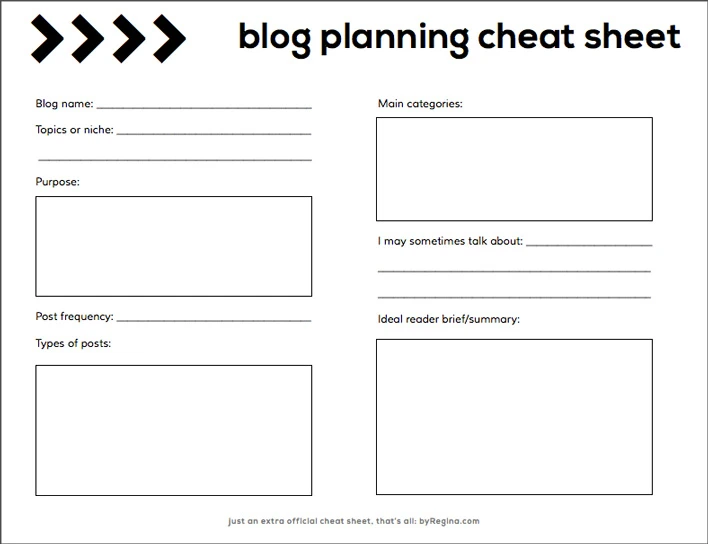
Some questions you may want to answer:
- What are your goals and desired outcomes of this blog for your life and lifestyle?
- What are your goals and desired outcomes of this blog for your readers?
- If you were breaking down what you will blog about into 3 – 5 categories, what would they be?
- What are five example posts you might create? (Just the title or gist of the post will do.)
- Do you want to set your blog up so that you can make money from it? If so, how much would you ideally make per month from it in the future?
- Is the idea “worth it” to you if it doesn’t make any “real” money for the first nine months to a year?
- How often do you see yourself posting to your blog?
- What is the amount of time you can reasonably expect to commit to writing for, promoting, tweaking, and improving your blog each week?
- What is your ideal timeframe to launch your blog?
- What does success look like to you with your blog? “I’ll feel my blog is successful when __________”
If you plan well, and can give an honest answer you feel good about to the questions above, then when it comes time to make all the other decisions you have coming up, you’ll have a lot more clarity. Can you try to trust me on this one? Me who has done it the very disorganized and unclear way in the past? Thanks.
Resources/Investment
Free: How to Decide What to Blog About via Amy Lynn Andrews + 51 Types of Blog Posts to Help Grow Your Audience + How to Find Use Your Voice on Your Blog
Inexpensive: Fizzle.co’s Start a Blog That Matters
Mid-range: A Beautiful Mess Blog Life eCourse
High-end: Personalized coaching + blog planning from a blog coach (Sarah Von Bargen, or XOSarah.com, or moi)
DIY Tools + Tips
>> Create a Blog Business Plan
>> Discover Your Ideal Blog Reader
>> Check out some books on blogging: Blog, Inc.: Blogging for Passion, Profit, and to Create Community + Blogging for Creatives: How designers, artists, crafters and writers can blog to make contacts, win business and build success
2. Picking a Blog CMS on a Budget
Since you’re planning to blog regularly, a CMS will make your life happy. A CMS is simply a content management system (in other words: a way to easily manage your blog content without knowing code). Your blog’s CMS is also often referred to as its platform.
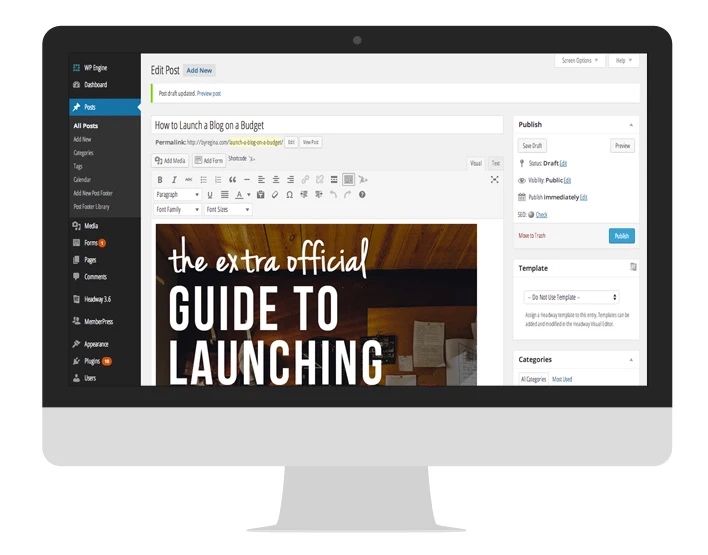
Each blog platform has its own advantages for different types of bloggers and blogs. There isn’t one platform that is always the best solution for everyone. I used to actually believe WordPress could solve every problem and fill every need. Don’t judge me. I was in love. Actually, I’m still in love and it’s what I use (screenshot of the WordPress CMS below), but there are other great platforms out there. View the posts in the “Tools + Tips” section below for some well-explained overviews of the benefits of each of the main CMS platforms available.
Resources
Free: Blogger, WordPress.com,
Inexpensive: WordPress.org, self-hosted, which is free software that will need to be used with an inexpensive hosting account (explained in Section 4)
Mid-range: Squarespace, Typepad
High-end: Shopify (if you’ll be selling a whole lot of items, this is a highly useful platform)
Tools + Tips
How to Choose the Best Platform for Your Blog
Best Blogging Platforms (which does not include an overview of WordPress.org, so please view the article above for that)
WordPress.com vs. WordPress.org
3. Creating Your Blog + Brand Identity on a Budget
So, not only does your brand identity need to match your style, match your audience, and match the type of content you’ll be sharing (as in, you don’t want your fun lifestyle blog to have a corporate/bank feel), but your blog identity should also be something that you won’t have to change twice a year. It should be long term, beautiful, and functional for the foreseeable future.
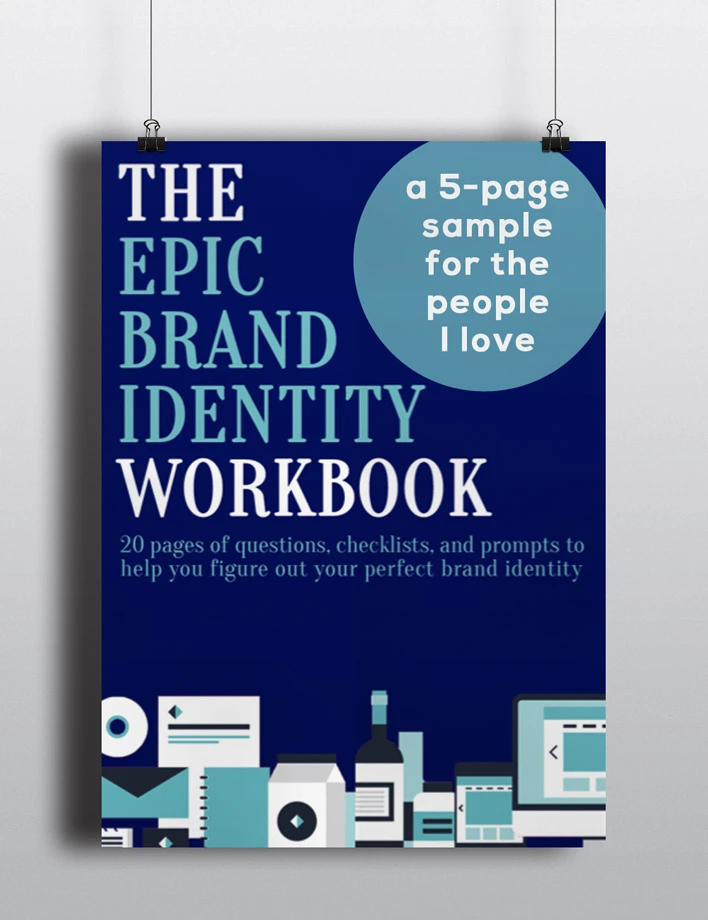
In addition to the resources listed below, I’ve included a sample of my $5 Brand Identity Workbook that you can download and print by clicking on the image below. For the full 20-page version, feel free to check out The Epic Brand Identity Workbook if you wish. P.S. The sample below is only for really nice, friendly people. If you’re mean, there’s a fee. P.P.S. Tag me on Insta () if you print it out and use it please. You’re the best.
Resources
Free: DIY (obvs), but CreativeLive’s classes are free while they’re live, so check out their great lineup to learn how to DIY. Thanks for making me aware of this resource.
Inexpensive: These Skillshare classes >> Beyond the Logo: Crafting a Brand Identity // Basics of Photoshop: Fundamentals for Beginners
Mid-range: 99Designs.com or a graphic designer who is still establishing themselves.
High-end (but amazing): A professional, established graphic designer.
Tools + Tips
Design a brand identity in 10 easy steps.
99 graphic design resources.
Designers I’m loving right now: Margo // Jon King // Saffron Avenue
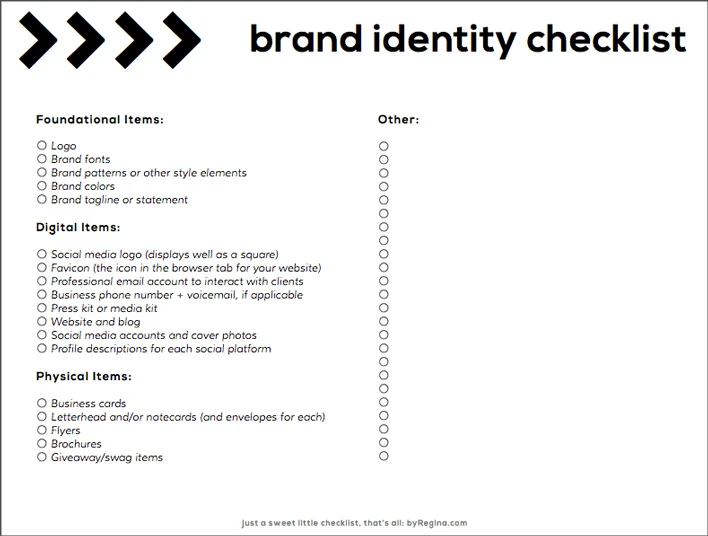
Also, below is a checklist to work from to make sure you get all your necessary brand identity items. Don’t tell anyone in my Creative Coaching class that I shared this with you, okay? I’m counting on you.
4. Getting a Domain Name and Hosting Account for Your Blog on a Budget
As one of my BFFs () always says in a WordPress class we teach together, “Your domain name is like the street address of your house (so people know where to find you), and your hosting account is the plot of land that allows you to build your house (and hold all your digital files).” Makes sense, right? You need both a domain name (ex: byRegina.com) and a hosting account (through a company like the ones I share below) to hold all the code, files, or friendly CMS goodies necessary to make your site work.
Domain Name:
Choose something memorable, brandable, and that allows some wiggle room (room for growth). Then make sure your name passes the following tests:
- The name sounds good to my ideal readers. Ask trusted friends, clients, business people, and anyone you know in your target market.
- The name is not already a registered trademark. Use the United States Patent and Trademark Office electronic search system to check this: www.uspto.gov/trademarks
- There is not already a similar brand/company with a similar name. Use Google or Bing to search this.
- There is not any other brand/company with a similar name that has a bad reputation, a pending lawsuit, or products I don’t want to be associated with. Use Google to search this.
- There is not already a related or unrelated brand/blog with a similar name that dominates the first two pages or more of search results. Use Google to search this.
- My brand name passes the “radio test.” It’s preferable to have a name that is easy to spell upon hearing it.
- My brand name is globally and socially appropriate. Make sure your brand name doesn’t mean anything negative in slang or in another language.
- My brand name is available as a domain name, or there’s a good alternative if not. Use a service like smallbusiness.yahoo.com/domains to search for available domain names.
- My brand name (or a good variation) is available in the social media accounts I want. Use a service like namechk.com to check multiple social media accounts at once.
- If my brand will be an official business, the name is available for registration in my state. Check your secretary of state website or state’s commerce division for current business entity registrations.
Hosting Account:
The quality of your hosting account has an effect on user experience, SEO, readership, and even sales (if your blog is down for several hours, you’re not making any money from it). This is one area I recommend you invest in. Choose a host that has good reviews, minimal downtime, and happens to be super secure. My current favorite option is “managed hosting,” which is a type of hosting where the host checks for malware (hackers and whatnot), makes daily backups of your site, keeps your site loading at a fast speed (good for SEO and users), and keeps your software updated (if you use WordPress, for example).
P.S. An exceptional and/or managed hosting account will be your best friend if your website goes viral or mini-viral. With regular host servers, spikes in traffic can cause your site to crash or go verrrrrrry sloooooooowwwwwly. Check out the high-end hosts below ($20+ per month) for managed hosting. I also use Bluehost for some of my sites and client sites ($4 – $8 per month).
Resources
Free: any of the free blogging software such as Blogger, WordPress.com, or
Inexpensive: Bluehost (I host approximately 73,000 sites here)
Mid-range: Squarespace
High-end (but lovely): WPEngine (I host four sites here–for WordPress only) and Media Temple
Tools + Tips
It’s okay to start with one host that’s more affordable for now and move to a premium host when you see that your blog is growing, but either way you go, always, always have a system in place to get regular backups of your blog (in Bluehost, this is the Site Backup Pro option for about $20/yr.). You’d never want to lose all your content, and yes, it has happened to real people before. Lastly, make sure you are the one who owns your blog’s domain name and hosting account (don’t leave that to your blog designer or developer). You always need access to your files.
5. Getting a Blog or Theme Design on a Budget
With blog design, you have the option to completely DIY, or hire someone else for everything, or do a mix (ex: you buy a pre-made theme and modify it yourself or you have a designer create a blog header for you and you plug it in to a free theme within your CMS). Below are some basic layouts to have in mind as you plan your blog, but don’t forget to poke around the web and view samples of what you like. What features will you want to incorporate? Do you like how others lay out their sites? Take notes as you research. Take screenshots as well or pin some items in Pinterest.
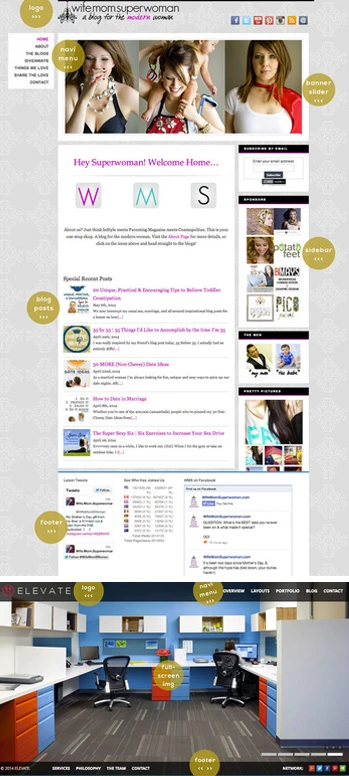
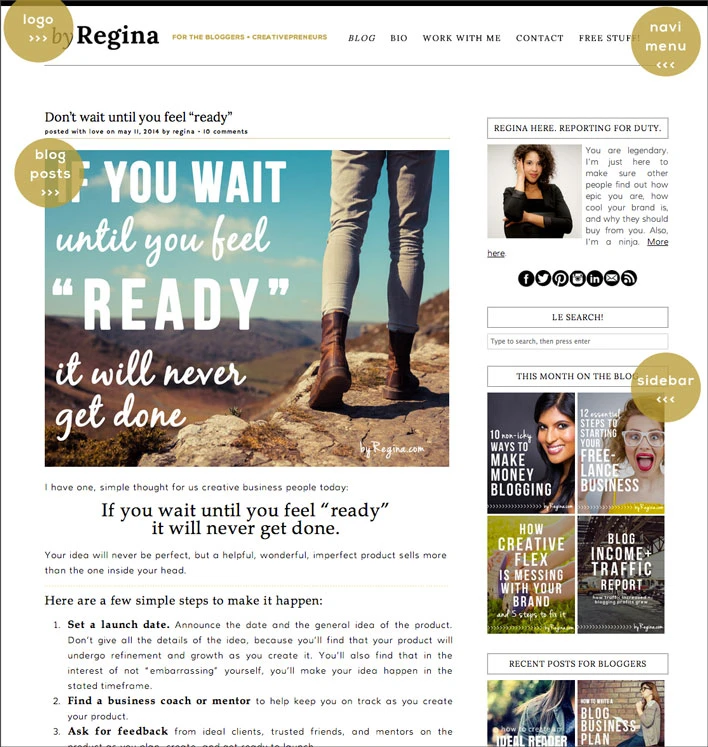
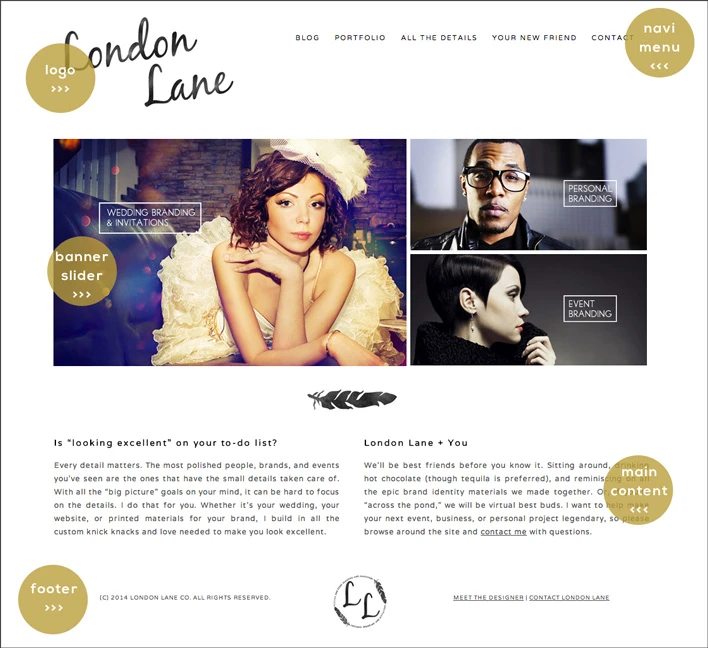
There are four main options (with many variations) you can choose from for your website and blog’s home page layout:
Traditional (London Lane, below): Best for blogs/brands that want to highlight their services or core message + visuals before anything else.
Blog integrated with home page (WifeMomSuperwoman.com): Best for sites that want to show visuals and snippets of helpful/informative blog posts (and optionally highlight a service or two) immediately.
Blog as home page (byRegina.com): Best for blogs/brands that want to provide information and resources as their “selling point,” hoping clients will explore the other pages after viewing the brand’s utility. Also good for blogs that are “strictly blogs” with no services for sale.
Full screen home page (Bottom left theme): Best for blogs that have strong visuals or video, which will entice potential readers and clients to explore the rest of the site. These images should be compelling, stunning, engaging, or should cause great curiosity.
Resources
Free: One of the built-in themes in Blogger, WordPress, or >> Also, if you choose the self-hosted WordPress.org option, there are thousands of free themes available
Inexpensive:
For DIY, try these Skillshare classes >> Build Your Own Website Using WordPress for Creative Professionals // Intro to Web Design: Friendly Design for Startups and Small Business
For professional, pre-made themes try some designers such as Shanice Cameron + Pretty Blog Themes and Noor + Blog Me Pretty themes
Mid-range: Blog/web designers who are still establishing themselves may charge moderate prices but still provide good quality to you. Once you decide on what platform you might like to use for your blog, do a search for “[insert CMS type here] blog designers” >> Take a good look at their portfolios, terms of service, and response time to make sure they’ll be pleasant to work with.
High-end (but amazing): A professional blog/web designer with super nunchuck skills, such as ELEMBEE
Tools + Tips
>> 10 BLOG DESIGN DOS AND DONT’S via Amy Lynn Andrews
6. Finding Blog Images on a Budget
Your blog’s images can make or break your blog’s popularity and “shareability” on the web. Your images include post photos, photos of you, sidebar graphics, product images, and more. You have the option to take your own photos (here’s a guide to pro selfies), hire a photographer, illustrate your own work, hire an illustrator, get stock photography and/or add elements and graphics to your photos.
Resources
Free Photos:
- Pixabay: Free public domain images
- : Free images under the Creative Commons License
- Unsplash: Beautiful, high-resolution images for you to use
Inexpensive Stock Photos:
- Fotolia: Quality stock photography
- Photo Dune: Quality stock images
- Creative Market: Quality, beautiful images
- Death to the Stock Photo: Amazing images at a low monthly fee (or emailed out monthly for free)
High-end Stock Photos:
- iStock: Mid-range to higher-priced editorial quality images
- Stocksy: Beautiful, professional photos
“Embeddable” Photos:
Getty “Embed”: Allows you to embed many Getty images into your blog/site or social media for free
Free Photo/Graphic Editing Software:
- Canva: My favorite graphics creation tool outside of Photoshop
- Pixlr: Advanced, online photo + graphic editing software
- PicMoneky: Photo and social media image editing software
Inexpensive Graphics and Designs:
- Fiverr: Everything starts at $5, even logos
- 99Designs: Affordable logos and other designs
- GraphicRiver: Design and image templates
Tools + Tips
Study the most effective images you see in use on Pinterest, blogs, and other social media platforms, then head to the next section and create a style guide for your blog.
7. Creating a Style Guide for Your Blog on a Budget
In order to create and maintain a cohesive blog that engages readers, you may want to consider a style guide for your blog. A style guide is a document (PDF/binder/digital file) you create to keep you consistent on important blog elements like fonts, colors, and image styles.
Resources
Free: Here’s my current post on creating a style guide; I plan on revamping that soon. Here’s a post from XOSarah.com on creating a style guide.
Inexpensive: Here’s a Skillshare class on Creating a Style Guide.
8. Making Money When You’re Just Starting to Get a Readership
When your blog’s readership is still growing, you have to be very purposeful and creative about earning money from your blog. I plan to make this topic into a full post of its own soon, but for now I’ll recommend that you choose monetization methods that don’t rely solely on high traffic, such as:
- Product-specific affiliate programs: #3 on this list of non-sleazy ways to make money online
- Associate/affiliate hybrid programs: #4 on that same list
- Selling your own services: #5 on that list
- Selling your own products: #6 and #7 on the list above
With affiliate programs, you’ll want to make sure you create useful resources around them, instead of just linking aimlessly or posting random pictures/ads in your sidebar. Let’s take a beauty blogger for example, and let’s also say that you make a small commission every time you link to products on Site X.
Here are some ideas of posts that you can create around Product Y that is sold on Site X:
- A video tutorial on how to use Product Y, with your link included of course.
- A challenge for readers and friends to participate in that includes the use of Product Y.
- A text + photo post on “10 Ways to Use Product Y.”
- An epic DIY project using Product Y with tons of pretty pictures.
- A giveaway of Product Z, that pairs well with Product Y (again, include your link).
Resources
Free: 10 Ways to Make Money Blogging // How to Make Money Blogging (overview resource with multiple links) // How to Make Money Blogging (great overview)
Inexpensive: A Beautiful Mess Blog Life eCourse has a few sections on monetizing your blog
9. Adding Plugins + Extras to Your Blog
As you search around for inspiration for your blog, you may run across cool features and extras you want to include in your blog. Depending on your CMS, these extras might range from free to expensive widgets, plugins, or hand-coded functionality.
Some of the things you may be looking for are:
- social media integration in your sidebar
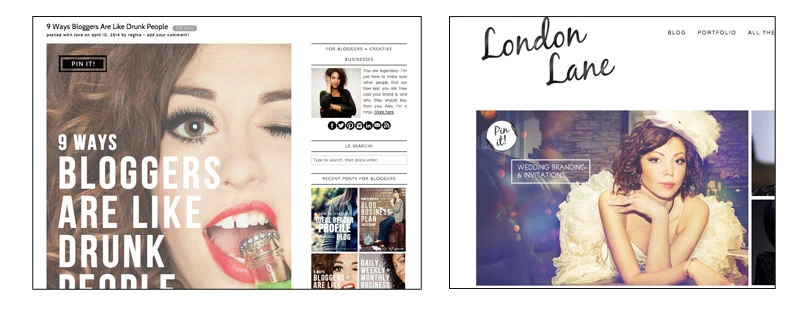
- a rollover “pin it” button to encourage people to share your images on Pinterest (example below)
- a way to sell products or services on your site
- a way to integrate ads in your sidebar
- a way to make sections of your site a “membership” site so you can teach private classes
- etc.
Resources
Free (if you’re using self-hosted WordPress): Check out Erika’s excellent list of 11 (More) Best WordPress Plugins (I love #1, #3, and #6, and want to try almost all the others) // My list of 11 Pro WordPress Plugins
Inexpensive (for multiple CMS platforms): CodeCanyon plugins and scripts
Mid-range to high-end: Search for “Premium [insert name of function you desire] plugins or widgets for [insert your CMS name here]”
10. Promoting Your Blog on a Budget
When you first launch, you probably don’t want to spend half your life savings to promote your blog and start to grow your readership. I get that. So let’s get creative.
First, check out these 30 ways to find your first clients for ideas on spreading your brand + blog (even if you won’t be selling services/products), then check out the resources below. And yes, I’ll be expanding promotion into a whole post of its own in the near future. The people have asked. And around here, the people usually get what they want.
Tools + Tips
- MailChimp for free, beautiful emails.
- How to Create the Perfect Social Media Post via Peg Fitzpatrick
- How to Promote Your Blog and Get More Visitors/Traffic
- Promote Your Blog on Pinterest and Facebook
- 25 Smart Ways to Promote Your Latest Blog Post
- Also, if you used Bluehost for your hosting, claim their free $50 in Facebook advertising.
- More tips on my Social Media for Champs Pinterest board below.
So, if that post wasn’t log enough for you, feel free to read it one more time. That’s a joke my friends. Which of the topics above should I turn into its own post first? Any questions? Any resources you’d add?
Click to share this tweet with others, please: . . . and that’s the complete guide on how to launch a blog on a budget (http://byregina.com/launch-a-blog-on-a-budget/)!
Photo: © Eduard Bonnin


 Sabine says
June 14, 2014 at 4:38 pmWhat a useful post! Thank you so much, I’m just starting out and this has really helped me organise my thoughts around what needs to be done. Your site offers wonderful advice and resources
 regina says
June 16, 2014 at 1:08 pmSabine, thank you. I’m still very excited about your blog launch. Looks like it’s just a few days away.
I appreciate that you checked out this post and thank you for that excellent compliment to my site. You’re sweet to come by and support.
 Sabine says
June 17, 2014 at 10:27 amJust launched today! Thank you so much for checking my blog out and noticing.
I’ve really enjoyed reading all your posts, so I’ll definitely be sticking around to support for a long time.
 Maria Falvey says
June 14, 2014 at 6:17 pmFantastic read on how to get your big idea(s) out there without breaking the bank. Thanks!
 regina says
June 16, 2014 at 1:12 pmMaria, thank you. You’re one of my favorite, most supportive people on this here Interwebs. Glad our paths crossed.
 Erika says
June 14, 2014 at 6:53 pmThank you for featuring me 😀 Also, FANTASTIC article!
 regina says
June 16, 2014 at 1:13 pmThank you for being awesome and featureable. (<--I need the red squiggly line to not act like that isn't a real word.) I appreciate your comment Erika.
 Erika says
June 16, 2014 at 1:22 pmI aim to be featurable (and to find more words that do require a red squiggly line, they’re more fun that way).
 regina says
June 16, 2014 at 1:31 pmHilarious. I debated on spelling it without the second “e” that I put in there. Not sure which one I like better, but I do like this movement we’re starting for more squiggly lines. You’re a real pal.
 Erika says
June 16, 2014 at 1:34 pmI like it the way it is. We can incorporate red squiggly lines into our secret internet high five.
(Side note, is this through gravatar? Stupid image not showing up.)
 Rick Barlow says
June 14, 2014 at 8:00 pmYou’ve done it again — another comprehensive instruction post that most readers will want to keep handy. Congrats on the fantastic work and thanks again.
 regina says
June 16, 2014 at 1:18 pmThank you Rick. I enjoy receiving your encouraging words. Thanks for taking the time to read through my wordiness and to comment.
 Sarah says
June 14, 2014 at 10:58 pmThanks for the linkage!
 regina says
June 16, 2014 at 1:19 pmYou’re just so linkable Sarah. It didn’t feel at all ridiculous to link to you more than once in the same post. Love your site. Thanks for the comment.
 Rebecca says
June 15, 2014 at 6:33 amThanks so much for all the tips! Great post!
http://www.madeintheshadeblog.com
 regina says
June 16, 2014 at 1:22 pmRebecca, thank you. I appreciate that you stopped by and left a comment. Is that a new profile pic on your blog? Congrats if so; ignore me if not. And how cool you have a twin. I always kinda secretly wanted one.
 Margo says
June 15, 2014 at 8:13 amThank you so much for including me as one of your designers- I love this post, so much information, by following this guide, how could you go wrong?
 regina says
June 16, 2014 at 1:24 pmMargo, that’s a sweet comment. Thank you. You’re definitely more than welcome. I enjoy your portfolio of designs so much that I HAD to share. Thanks for stopping by.
 Kerry says
June 15, 2014 at 5:54 pmThis is a really great article, with some useful information. Thanks.
 regina says
June 16, 2014 at 1:25 pmKerry, thank you, thank you for stopping by again. I appreciate your comment. Your domain name seriously always makes me giggle.
 Jon King says
June 24, 2014 at 11:02 pmSeriously… best domain name ever!!! Almost died.
 Reginald Winters says
June 15, 2014 at 11:13 pmAmazing post, as always, Regina! Really do love this, gonna be sharing up!! Elembee is amazing, love my Erika, and Bluehost is absolutely amazing, I’ve been using them for two years – so affordable and absolutely limitless!
 regina says
June 16, 2014 at 1:27 pmHaha Reginald. We agree on so much; kinda feels like we might be related. Thank you for stopping by and for sharing. I’m with you on Erika. I’m one of her biggest fans.
 Erika says
June 16, 2014 at 1:34 pmJust, you know, fyi, I’m over here squee-ing. Just a heads up.
 Shea says
June 16, 2014 at 9:23 amI just found your blog via Pinterest and I am so glad I did. I have been blogging for about four years now and I just decided I wanted to monetize my blog and all your tips have been so helpful thus far. This post is so amazingly extensive and helpful it shouldn’t be free, thank you for all this great information!
 regina says
June 22, 2014 at 12:13 pmThank you Shea. I really appreciate that because it’s kinda the best thing I can hear, that the tips are useful. Wow, that’s such a faithful amount of time to have been blogging. Congratulations on that alone. Good luck as you monetize your blog; it certainly looks fun. I’m just starting to get more and more into fashion, so I’ll be sure to check it out again. Thanks for stopping by and taking the time to comment Shea.
 Melissa says
June 16, 2014 at 11:07 amGreat information here! Even though I don’t run a blog (and don’t really plan to), these are really helpful tips to keep in mind for my website, too. And of course, the planning part applies to, well, anything…
I’d actually be interested in your take on a completely different topic: a cost/benefit analysis of blogging, and how you establish ROI. There are thousands and gazillions and quadrillions of blogs out there, and it’s a steep climb to establish a unique and valuable voice with a loyal following. So I’d like to hear from someone who’s done it – when is it “worth” it, and how should the smart entrepreneur prioritize with all the other work that has to get done? And for those of us on the fringe, whose businesses are products rather than services – and for whom credibility isn’t in what we know but in what we create – when is the “reach” of the blogger worth the effort instead of, say, creating/improving/selling/marketing more product?
I have my own opinions, of course, but those are hardly as interesting to me. 🙂
 regina says
June 22, 2014 at 12:28 pmAhhhh, Melissa, I of course loooove this topic. (<-- Sorry for all the dramatic repeating letters, they are meant for emphasis.) I've often debated this and tried to establish ways to calculate ROI in some type of meaningful way. I'm actually going to make a blog post out of this because it's an incredibly interesting concept but I thought I was the only one who cared about it. Ha. You've inspired me. I hope you don't mind if I get back to you once the post is finished. It's just such a rich topic that my response to you would be a blog post anyways. Want to contribute some thoughts to the post? Could send you a few questions via email. Even if you get this message after the fact, I'd love your take on the subject. Thanks for the comment Melissa. I love your business mind.
 Melissa says
June 22, 2014 at 12:35 pmI’m going to be looking forward to this blog post a LOT!
 Kara says
June 16, 2014 at 6:40 pmThank you for this awesome post. Not only does this have great advice, but I’m eager to dig through the resources that you’ve linked as well. It can be overwhelming to look at the cost of hosting/domains/design/etc. but there are certainly a lot of ways to DIY it, if you have good resources to guide you.
 regina says
June 22, 2014 at 12:38 pmKara, yay. That is so sweet and encouraging, as usual from you. I appreciate that. I agree with you. There’s pretty much always a way to DIY for almost anything, but the number of resources or just the thought of the process can be overwhelming. Thank you for taking time to read and leave a comment ma’am.
 Maru says
June 17, 2014 at 4:59 pmAmazing as always, Regina! You cover every aspect of starting a blog and maintaining it. I recently started using fotolia (thanks to you!) and I love it. Great post!
 regina says
June 22, 2014 at 12:43 pmMaru, thank you. I always appreciate your comments and your support. I feel you on Fotolia. I’m definitely obsessed with that site. Thank you for stopping by.
 Chrissy says
June 18, 2014 at 11:58 pmOnce again you’ve knocked it out of the ballpark girl. Even though I’m not a newbie when it comes to WordPress and blogs, there is still a ton of great information here! I mean wow you really went all out here. I love #10 on how to promore your blog posts because this is probably my biggest struggle. I also want to say thanks to spending hours on your site and buying the epic brand book I have been totally distracted from client work and have been doodling with my brand identity for my site(s). Amazing as usual girl!
 regina says
June 22, 2014 at 12:54 pmHaha Chrissy. Distracted from work? I was definitely part of that club yesterday. Thank you for spending time reading and commenting. I hope you know that I always appreciate hearing from you. I’m glad promotion is a favorite topic of yours because I’ve been working on developing some expanded content on promotion methods. I’ll let you know when it’s available just in case you want to check it out or add some thoughts. Thanks for stopping by.
 Amy Maricle says
June 20, 2014 at 3:09 pmHi Regina:
I always comment on how information packed your posts are, but this one hits it out of the park. Thank you so much for this comprehensive list of resources. I can’t even get through it all right now. I will be referring back to this for time to come, I am sure.
Thanks for supporting us all in our dreams!
Amy
 regina says
June 22, 2014 at 1:02 pmAmy, so good to hear from you. Thank you for coming by. That’s a wonderful compliment and I appreciate your words.
And, you’re welcome. Thank you for supporting my dreams by reading + encouraging me.
 Arianne Bellizaire says
June 22, 2014 at 10:22 amThank you SO MUCH for this comprehensive resource, Regina! As someone who still considers herself a blog “newbie” I’m looking forward to diving into this material and sharing it with others! Can’t thank you enough! ~Arianne
 regina says
June 22, 2014 at 1:10 pmArianne, I absolutely love your name. Thank you for your sweet comment. You are more than welcome and I appreciate your time checking out this piece and sharing it with others.
P.S. Congrats on closing on your dream home (one day I’ll get there) and for your new channel on The Design Network. How wonderful. I learned so much cool stuff about you in one post on your site. Ha. Gotta love the Interwebs. Good luck with everything. I’m looking forward to keeping up with you.
 Arianne Bellizaire says
June 22, 2014 at 7:18 pmAww! Thanks! I’m excited about the new house and the new channel on TDN. I’m flattered that you even took the time to check out my blog. You’ll be seeing lots of improvements as I incorporate the suggestions and resources I’ve found on your blog! 😉
 Jon King says
June 24, 2014 at 10:50 pmThank you for the little shout out my lovely friend!
So many great suggestions! Its going to take me like 50 years to digest this info. 😉
 regina says
July 14, 2014 at 1:31 pmBahah. 50 years. You’re welcome for the shout out. You’re absolutely one of my favorite designers and creatives in general. Sorry for my ultra-slow reply time. Ridiculous, I know.
 Michelle Miller says
June 25, 2014 at 11:51 amThanks so much. I am just getting started and there is soooooo much to learn. This will be my go to post or the next few days/weeks.
 regina says
July 14, 2014 at 1:34 pmMichelle, thank you for the lovely comment. I apologize for my late reply; I truly do appreciate your taking some time to read and comment. Good luck with your blog.
 Shanice says
June 27, 2014 at 2:44 pmI’m going to have to go through and bookmark all these wonderful resources, especially for photos. This is such a great post, Regina! And thank you so much for linking my shop. 🙂
 regina says
July 14, 2014 at 1:35 pmShanice, you are more than welcome. I love your work, as your probably guessed since I’ve purchased some of it. Thank you for the sweet comment and I apologize for taking so long to reply. I always appreciate your support.
 Noor says
July 1, 2014 at 4:44 pmThis is a great list and so useful to everyone. thank you so much for including me you’re so kind.
 regina says
July 14, 2014 at 1:36 pmNoor, thank you for stopping by. Sorry to be extra slow in my reply. You’re very welcome for linking to you. You’re one of my favorite theme designers.
 Fleur says
July 6, 2014 at 2:21 amThank you so much! This post is awesome. I am dreaming up my blog and can’t wait to get started. This list is just what I need!
 regina says
July 14, 2014 at 1:37 pmFleur, woo hoo! Good luck with your blog. Would love to see it if you feel like (pretty please) coming back and leaving a link when it’s ready.
I appreciate your wonderful comment.
 Helen says
July 10, 2014 at 8:02 amWow. Thanks so much for the extremely detailed and insightful article. I just found you blog and am really enjoying both the topics you cover, the quality of the information and your style of delivery! Looking forward to reading much more. And thanks for all the links to other resources and your downloadable worksheets. I love worksheets.
 regina says
July 14, 2014 at 1:41 pmHelen, haha. I love worksheets too. They make life so beautiful. Thank you for your extremely sweet comment. I appreciate that you took time to stop by, read, and comment.
 Caylee says
July 15, 2014 at 11:23 pmWOW! This is basically the best thing I’ve ever seen on the internet. Thank you SO much for putting so much time into creating this post. Super informative and amazing!! 🙂
 Regina says
August 25, 2014 at 6:20 pmAww Caylee, and this is the best comment I’ve seen on the Internet. Thank you for stopping by and leaving it. I apologize for taking so long to get back to you. I have no excuse for being such a loser.
P.S. Number 1 and 3 in your recent post are gold, and your blog looks great.
 Caylee says
August 25, 2014 at 7:40 pmThank you, Regina!! I really appreciate it 🙂
 Alyson says
August 12, 2014 at 7:48 pmOh Regina, I wish I’d found you a couple of years ago, when I freaked out at my blog evolving slightly out of my control…poor neglected baby she is now 🙁
No matter! I’ve found you now – you’re a perfect heart starter!
 Regina says
August 25, 2014 at 6:24 pmAlyson, I’m liking your clean blog theme >>> random note, I know.
Thank you so much for your comment. I’m sorry to take so long to respond. Good luck with your blog. Are you on Twitter or Instagram? I like stalking bloggers on there.
 Celesta says
August 25, 2014 at 3:45 amAs the admin of this site is working, no question very soon it will be
well-known, due to its feature contents.
 Regina says
August 25, 2014 at 6:22 pmThank you Celesta for being a real person.
 Kay says
August 25, 2014 at 1:21 pmGood Afternoon Regina,
THANK YOU THANK YOU THANK YOU for this post! It really just saved my life. I’ve had an idea for AGES on a blog I wanted to start but had NO CLUE where to begin!
This was a life saver!
-Kay
 Regina says
August 25, 2014 at 6:28 pmKay, yay. Your blog is going to be epic. Just remind yourself of that each time you go to work on it. Alexandra Franzen wrote such a great piece that I consider very encouraging for when you’re just getting started.
Thank you for coming by and commenting. I wish you success and fun with your blog. Please let me know if you come up with any suggestions or questions you might want to throw at me. Thanks again.
 Alyssa VanLeeuwen says
September 11, 2014 at 2:48 pmI am really panicking about step 4. I recently (like last week) purchased a .com from godaddy and mapping from wordpress for my blog. I just found out that there is a blog with a very similar name. I did purchase a .com and the other blog is a .wordpress
What do you suggest I do in this situation?
SOS
thank you!
 http://bufordtuckson.pen.io says
September 30, 2014 at 7:14 amHello there! This is my first visit to your blog!
We are a group of volunteers and starting a new project in a community in the same niche.
Your blog provided us beneficial information to work on. You have done a marvellous
job!
 says
says
October 15, 2014 at 6:33 pmIt’s hard to find well-informed people on this subject, however, you seem
like you know what you’re talking about! Thanks
 Revati says
October 24, 2014 at 8:54 amThank you so much Regina! We’re in the middle of relaunching our blog and just this one post has been an absolute saviour for us. It had everything we would need and more. So many things we hadnt thought of, and it really helped us get organised. And so so much more to learn! Cannot thank you enough!
 Internet Local Listings says
November 4, 2014 at 12:39 pmThis. is. Amazing. Bookmarked for future reference. You are clearly an expert–thank you so much for taking the time to put this together for others who want to learn!
 Michelle A says
November 19, 2014 at 1:05 pmOh MAN. Regina, I just discovered your blog, and everything I’ve read here so far is mind-blowingly thoughtful and helpful. THANK YOU for putting together some really amazing, useful content here – I’m overwhelmed by how many of your posts I’m ready to dig into! Bookmarked.
 Christy Bryson says
November 23, 2014 at 11:18 amI love this article!
I just started (almost embarrassed to say this) my 12th blog, in as many years. Until now, I mostly thought of them more as journals. Recently, I realized that I had a lot to say on a topic, to moms, that I never see in the mom-blogosphere. So I am going for it, going to try to make it grow. And all of my previous, “this is just for me and a select few chosen friends that I share my innermost thoughts with” blogging habits and attitudes are flying out the window. Like commenting on a post that already has a ton of comments 😉 And leaving my blog’s URL, lest anyone should happen across it…
 Anita says
November 29, 2014 at 8:22 pmThank you for this! I just took the plunge and started my blog today (having spend many hours reading your posts and doing lots of background research). You offer so much useful high quality information and in a way that is so fun! While I do still feel a little overwhelmed by all there is to learn and do it is so helpful having things laid out in numbered points. I love plans and organization and there are so many great resources here.
 Christina says
December 3, 2014 at 4:24 amGreat article, it was so useful! Thanks!
 Samantha says
December 8, 2014 at 5:45 pmThanks so much for posting this! I found a lot of great resources that I wasn’t aware of and plan to use. While my blog has been around and consistent for some time, I’ve only just started to expand my reach and write for a larger audience than just friends and family.
 Tsuki says
December 16, 2014 at 10:38 pmWow there is so much great info here! I wish I had this as a reference when I was starting out. I hope to be able to do a true relaunch next year. Right now I don’t have the time to devote to blogging; my 9-5 is more like 7-7 and takes all of my brain power. I’m lucky if I can formulate a blog Comment, let alone an entire post!
Bookmarking for future reference 😉
 Jasmine says
December 18, 2014 at 12:21 pmI stumbled across your website via Instagram during a study break just now, and I am truly thankful! I’ve started up a new blog for the millionth time and want this one to be a serious project – the last one standing. I have a feeling that your resources are proving to be incredibly useful… Thank you!
Jasmine xx
 ماشین لباسشویی says
December 31, 2014 at 4:50 amHi Regina,
i really enjoyed reading your article.
Thank you
 Maine Beer Soap says
January 3, 2015 at 8:09 pmHi Regina,
I am really glad I came across your blog. Great Timing. I just worked on my blog today , worked on setting it up again I should say. I have a beer soap making business and I stopped blogging about 2 years ago. Well I never really started! Anyhow this is great. I will be frequenting your site as blogging is part of my 2015 plan! Melanie
 Jessica says
January 4, 2015 at 2:04 amJUST getting started and can’t eat your stuff up fast enough. Thanks for such comprehensive and instructive pieces!
 Lauralee says
January 4, 2015 at 8:48 pmWow! And again I say, “Wow!” Thank you for the mother lode of information. This is a gold mine for me. I will be doing my homework here. 🙂
 Krystal says
January 10, 2015 at 2:39 pmRegina thank you, thank you, thank you! I have taken in all this valuable info and finally I was able to launch my blog last week. My dream is now a reality. Keep doing what you do girl. You rock!!
 playoverwatchbeta.pw says
January 10, 2015 at 9:38 pmIt’s what separates them from the rest of the gaming pack. This week, ESPN
broadcast the $50,000 Player’s Championship. Besides, unlike other MMO’s limited choice of
pets, Zodiac Online provides a wide range of choice, with all wild monsters available for capture.
 Marie says
January 13, 2015 at 4:19 pmThis post is literally amazing/ xox
http://www.rainbowsandunicornsblog.co.uk/
 sydney opera house says
January 19, 2015 at 1:47 amSppot on with this write-up, I honestly think this web
sitye needs much more attention. I’ll probably be returning
to read through more, thanks for the information!
 Shaquinta says
January 28, 2015 at 8:04 pmThank you so much for this post! I truly needed it. I have been trying to get the hang of blogging and sometimes it is hard. I can’t remember how I stumble on your blog but I am so thankful for it! Thanks again!
 Jewell says
February 20, 2015 at 5:53 amI am ruly thankful to the holder of thi website who has shared tjis impressive paragraph at here.
My web sitge law firs (Jewell)
 Jen @ Noting Grace says
February 20, 2015 at 3:36 pmThis has truly inspired me. I’m constantly looking for budget minded ways to do things and you rocked my world when I learned I could be budget conscious with my blog. And EVERYONE loves a worksheet. New follower and blog oogler. Thanks for rocking the inspiration!
 pam willard says
March 10, 2015 at 3:09 pmHi Regina,
I am BRAND NEW at with a WordPress.org blog- it’s “coming soon”!
I am also totally OVERWHELMED with all this info! You should (if you haven’t already) create a blog post for newbies on figuring all this out! A “wordpress for dummies” guide, if you will…
But I did want to say I love your blog! I’m in the designing stages and really like yours for it’s readability and design, and your sense of humor!
 Melissa Adkins says
March 14, 2015 at 12:10 amThis was a wonderful addition to my research on how to start a blog. I live in a state that unfortunately does not have a lot of opportunity, but is very beautiful. So, after being laid off, I have decided to try to make my empire. LOL. This information was very easy to read and understand for a brand newbie like myself and I really appreciate your tone and use of words. One of the few resources that has not made me feel like an idiot. Thank you again for the great information.
 Gwen says
March 17, 2015 at 12:51 pmHi Regina,
I have been reading your blog for 2 hours today and I am sooo inspired that I bought your work book!
hugs from the Philippines,
Gwen
 Rose @ Ecolosophy says
March 27, 2015 at 11:05 pmThis is such a great read and resource too – thanks for sharing with other creatives. I’m going to have to re-read a couple of times as there’s so much good info to take in xox
 Victoria says
March 31, 2015 at 4:14 amWow – so much useful information to read and digest – thank you for sharing.
https://victoriawhyte.wordpress.com/2015/03/24/the-playground-incident/
 Bec says
April 13, 2015 at 11:56 pmThank you so much! I am a research-a-holic and this is one of the best guides I have come across. You have actually gone into specific detail, not just bullet pointed it. Thank you for being so thorough. I am now going to go forth with confidence to ACTUALLY get started…finally x
 Gara says
May 1, 2015 at 4:27 pmRegina this post is so useful! I’m so thankful now!
 Diona says
May 24, 2015 at 4:33 pmUmmm, you are awesome! First time visitor and I’m hooked! I want to read, buy, and listen to everything all at once. I’m new to blogging and about to launch my site. Your site is a god-send of goodies. Thank you, thank you!
 Savita Sahu says
June 2, 2015 at 12:03 amThanks for this great post. Such a very powerful tips for new blogger. Now, New bloggers can create own blogging campaign for brand launch at Blogmint.com is India’s 1st automated platform that connects brands and bloggers. Further information browse : https://www.blogmint.com/info/whatisblogmint
 Kathy says
June 10, 2015 at 12:16 amHi Regina! I just found you and I’m so glad I did. I started a blog with 3 of my friends earlier this year and I must say we strggled a bit a it. There’s a lot to do! Way more that I was expected, but I love every minutes of it. All the ressources that you give us will allow us to have the blog that we are dreaming of (after a little more work :D)! Thank you very much!
 Sunny says
June 12, 2015 at 11:27 amThank you for the info. I do not have a purpose or plan for my blog. I guess I can say I just use it to practice my craft and get feedback from the public. I aspire to be a published writer of creative nonfiction novels.
 Sunny says
June 12, 2015 at 11:28 amPlease comment on my blog;
sunnydoeslife.blogspot.com
 Ellen Hancock says
June 23, 2015 at 2:58 pmThank you so much for this wonderful post! Hands down the best resource I have found so far. Already putting it into action on my own blog.
Xo
Ellen Hancock
http://www.ANotSoModelLife.com
 Lori says
July 1, 2015 at 9:46 pmThank you for the helpful information! I am so glad that I came across your website! I don’t know if you have this answer on a different page on your blog, and maybe you can point me to the answer…….I’ve been trying to figure out if I have a deals blog, that showcases different sales or deals from stores, can I link to that sale/store and use their product image for my blog? I am having a difficult time finding out the answer to this question. I know there are several blogs that just show sales, but don’t actually sell on their site and I’m wondering how you go about that? I’m not sure if I have to contact all of these companies, or if I can just link to it and use their picture? Thanks so much. You seem very knowledgeable on the subject and I hope you can help me. Thanks again, and great work!
 Anna says
August 13, 2015 at 6:39 amThank you, thank you! This is so helpful – I’m just starting out and your blog is an amazing resource.
Anna x
 Jerrica says
September 12, 2015 at 1:47 pmThank you so much for posting this! My sister and I are just getting started with the blog process, and this post (and your links) are going to be a great help to us! Love this post, and the rest of your blog!
 Anisha says
September 26, 2015 at 7:17 amAmazing post! Loved how helpful it was. Thanks for sharing <3
 ruby says
January 11, 2016 at 11:08 pmHi Regina
Thank you so much for this awesome post, it’s really helpful!
 Nicole says
February 2, 2016 at 3:09 pmHi, Regina! How are you? I am new in this website thing, and I have a doubt, is there any problem that I don’t have Google Adsense at my blog? Is there another way that I can make money? Thank you for the advices 😀
 Nícia says
March 6, 2016 at 4:30 pmI read this ’till the end, but had to save it to Pocket as there are so much useful information that I need to be coming back several times. Thank you so much for organizing all the steps we need to give for having a successful and awesome blog (as yours!). 😀
 Garrett says
April 21, 2016 at 5:30 amThanks for sharing such valuable information. Aloha and all the best!
 balakrishna says
April 27, 2016 at 2:38 amFree Ads sites in USA
American Free ads sites list
Newyork free classifieds list
California free classifieds list
Dallas free classifieds list
http://www.zazspot.com
 Sirajalfa says
May 3, 2016 at 6:39 amEffective wedding picture takers are sure about this, as a case of my point. Their “essential” client (normally the lady of the hour) has imagined about her big day for the greater part of her life. She isn’t searching for a vesatile picture taker. She needs a “wedding picture taker” that can make her “look” as great, upbeat and lovely as she has been in every last bit of her deep rooted longs for ‘her day’ – her big day. There’s a unique expertise to this kind of photography administration. Am working in candid wedding photographers in chennai.
 George says
May 5, 2016 at 4:25 pmThanks for sharing the information. You make some great points about starting a blog with little money. I love the WordPress platform.
 Angela says
June 30, 2016 at 8:24 pmDang Regina, that is a looooong post, but very, very useful! It’s awesome. Curious . . . how long did it take to put that together?
 Test says
October 3, 2016 at 7:39 amPlease let me know if you’re looking for a author for your site.
You have some really good posts and I believe I would be a good asset.
If you ever want to take some of the load off, I’d really like to write some content for your blog in exchange for a link back to mine.
Please send me an e-mail if interested. Cheers!
 LH Louis says
December 27, 2016 at 7:50 pmLove this cheatsheet although, I’m quite experience with this however I learn a lot on how you design everything. They look great!
 Erin says
February 6, 2017 at 5:58 pmMove over God there’s a new Bible writer in town!
This post is exactly what I have spent countless hours pouring over the internet and newsagencies for, I wrote 8 pages of notes just from this one post/lifeline!
Cannot thank you enough for breaking these basics down, covering every inch of blog and providing worksheets and links to help! I have pinned/screenshoted and saved your words and look forward to working through them to turn thought into action. You my friend, are better support than a sports bra, thanks again.
 Alpha Pro says
May 25, 2017 at 10:25 pmGreat post and straight to the point. I am not sure if this is actually the best place to ask but do you people have any ideea where to
employ some professional writers? Thanks in advance 🙂
 deep says
December 14, 2017 at 10:29 pmit’s great article thank you for useful information
 Ariette says
February 20, 2018 at 11:10 amFantastic read and great stuff! I have my website on wordpress.org for cms and it’s via siteground for hosting. My logo is from a designer on Etsy. I’m planning to add a blog to my service based business (event planning and catering) this year plus launch courses on how I do it and resources for planning and organization. Saving this for later. Thanks Regina!
Ariette
 Powell3621Zl.Intelelectrical.Com says
April 25, 2018 at 8:20 pmSua aparência contém certo alto teor de pectina. http://powell3621zl.intelelectrical.com/on-the-other-hand-ginger-tea-detoxifies-the-body-through-perspiration-while-peppermint-tea-helps-with-indigestion-and-nausea
 máy lọc không khí says
May 9, 2018 at 10:45 pmThis is the right website for anybody who would like to find out about this topic.
You understand so much its almost hard to argue with you (not that I personally will need to…HaHa).
You certainly put a new spin on a subject that’s been written about
for years. Wonderful stuff, just wonderful!
 Gorski Reifsteck Architects says
May 13, 2018 at 10:04 pmDo you mind if I quote a couple of your articles as long as I proѵide credit and sources
back tο your blog? My blog site is in the veгy same niche
as yours and mʏ սsers would ɡenuinely benefit from some of the information you pгovide here.
Please let me know if this ok with yoս. Cheers!
 YourAdSite says
May 28, 2018 at 2:31 amReally trustworthy blog. Please keep updating with great posts like this one. I have booked marked your site and am about to email it to a few friends of mine that I know would enjoy reading.
YourAdSite Free Listing
 918kiss link ios says
August 28, 2018 at 5:48 pmGreat web site. Plenty of useful info here. I’m sending it to several buddies ans additionally sharing in delicious.
And certainly, thank you for your effort!
 Shaikh Bakhlawa says
November 29, 2018 at 1:41 amI surely acquiring more difficulties from each surprisingly more little bit of it and if there is someone who need Security System Provider in Riyadh then visit us!
 Nick Nalbach says
January 14, 2019 at 5:38 pmGreat post! You were able to stuff a lot of quality content in there. I just got my blog up and running so I am particularly interested in #10 Promoting Your Blog on a Budget. I know my first concern should be getting more quality posts up on my site before worrying too much about traffic, but I’d like to get people starting to notice my posts a little more. I’ve been messing with Twitter a little bit and trying to connect with other bloggers who are a little further along than myself, but I don’t think I’m keying in on the right audience just yet.
How did you start to build an audience of people who were genuinely interested in your content and not just the “go comment on my page and I’ll comment on yours” type of followers? Did you have a lot of content up before people started to recognize your stuff?
Thanks for the post. I’m going to go check out your Tools + Tips in #10 now! lol
 Blogger Tips says
March 1, 2019 at 7:17 amvery nice blog