
Not that text lessons and articles aren’t super valuable, but in the interest of making your online courses (or blog in general) more accessible, delightful, and useful for different learning styles, it is a good idea to explore the many types of media you can create—easily—and most often without any investment at all other than your time.
Check out the 23 types of media below that you can add to your online course, website, blog, landing pages, and more to create a more valuable and user-friendly experience for your students and audience.
Video
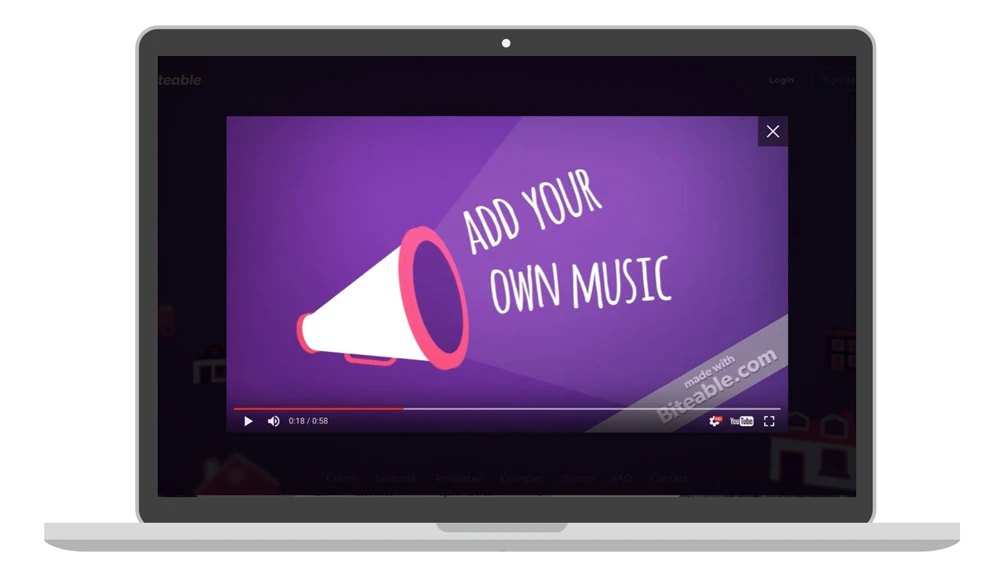
1. Animated videos with voice narration or an epic lesson
A nice change from slides (or from only including video of yourself), animated videos can be a great, clear way to communicate short lessons, to advertise your course, or to help students learn how to use your course dashboard. And yes, if you are wondering, I show you how to make animated videos from scratch, with a $0 video budget in The Epic Business Lock-In™.
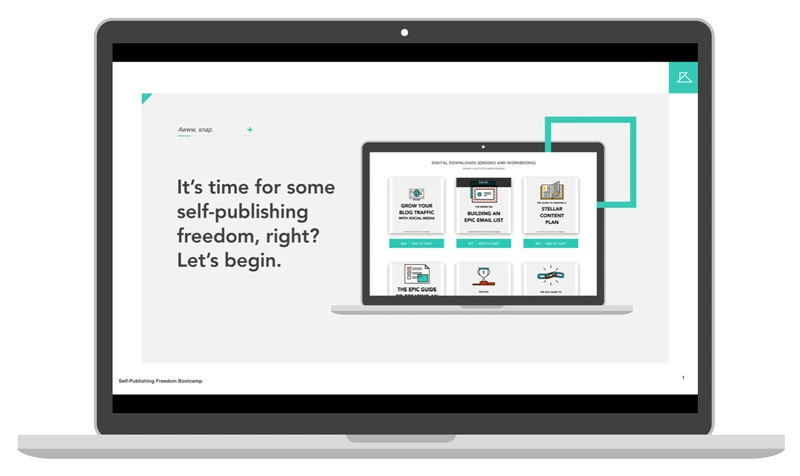
2. Recorded presentations—video of your slide deck with narration/lesson audio
I use these a ton in my online courses. Even for lessons that you already have completely written out as text lessons . . . if it’s something that looks good as slides, and will offer a different learning experience for your students, why not record a quick presentation? You can use QuickTime for free, or get software such as Camtasia or Screenflow to do this.
3. Live online workshops
One way to build out the modules of your course, or add valuable bonus content to them, is to create live online workshops on your course topic. You can use them as your main course sections by releasing them on a schedule and making them only available to your students, or you can use them as standalone content pieces (either paid or free) to build your email list or to have additional surprise content to offer your students or blog readers.
Even as a super duper introvert, I’ve now done more live workshops than I can possibly count. They are a wonderful way to get used to teaching, test out content, grow your email list, or build your course. If you’re considering doing your first live workshop, check out The 7 Types of Online Workshops You Can Use to Grow Your Brand, or my article on How to Create + Host Online Workshops (or Live Classes) for Free.
4. Online workshops, edited and repackaged (with extra goodies) after the initial recording
This is one of my favorite ways to create NEW value and new content out of something you’ve already done. You can take one or all of the live workshops you created in #3 above and make them awesome by:
- Editing the recording down and taking out unnecessary dialogue, time-specific references that don’t apply anymore (ex: “Next week I’ll be doing another workshop on X topic.”), and any sections you don’t feel went well.
- Adding in a re-recording of any sections that you want to redo. You can also add in corrected slides (if you noticed an error after it was too late to fix it), or entirely new sections that you think of by simply recording your screen (talked about below) and audio at the same time.
- Adding in a workbook to the workshop. Now that you’ve done the live event, you know exactly what you said, all the points you shared, and you have all the content done . . . why not make an actionable workbook or follow-along notesheets for your workshop? If you were rushing to get a workbook done before the event, you can now go back and make it everything you want to.
- Creating a PDF export of your slide deck (if you have one) for people to download and use after the fact to follow along with your workshop.
- Getting a transcription of your workshop, or transcribing it yourself, so that you have a text version of everything you said. This is something I’ve done by hiring someone form Upwork.com. Once you have a transcription, you can provide a more accessible version of your content to people.
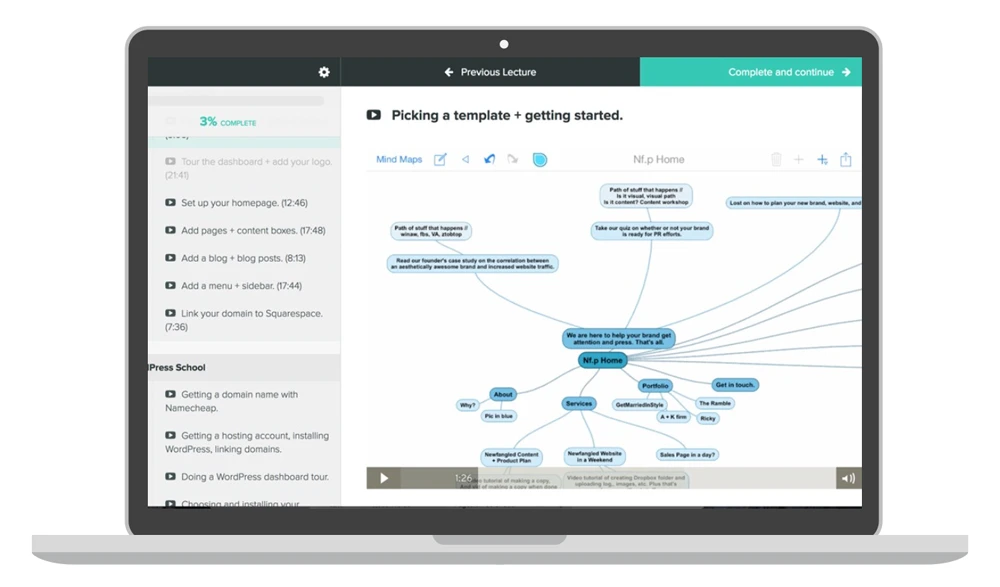
5. Screencasts
Videos of your screen (often called screencasts) allow you to provide software tutorials, or tips/hacks on how to do any type of computer task, and much more. In the example below, I’m talking through a flow chart for a business. Screencasts are one of my favorite types of videos to create and teach because they don’t require much tech (plus they don’t require you to have your face on screen if that’s not really your style) and can be done for free.
6. Interviews
Whether you’re leaning on an expert for great tips to share with your audience, interviewing people your audience will find interesting, or creating case studies out of the conversations you have with others, videos that feature you and one to two other people can be an amazing form of content—one where you don’t have to do all of the work, and one where you get to add more value to your students through the experience and knowledge of others.
, shown below, is someone who creates regular video content and frequently adds videos as bonuses or resources within her courses.

7. Videos of yourself
When many people think of making videos, they think of the “traditional” course/lesson videos that show a person, talking on screen, for anywhere from a few minutes to an hour or more. And even though there are many other types of videos you can create (as evidenced by this post), videos of yourself can still be some of the most personal, helpful, meaningful type of content you can create.
Your videos can be inspirational messages, quick lessons, course updates, answers to audience questions, and so much more. Plus, they don’t have to be difficult to create. I love how Bunny White, shown below, records some of for her new mastermind brand with simple tech such as an external webcam and QuickTime software.
8. Tutorial videos
Whereas videos of yourself are traditionally though of as sitting in a well-lit space talking to the camera, you can also create videos of yourself that are tutorials on how to do something, like (shown below). You can even create tutorials that only show your hands, or that feature someone else, or that are screen recordings instead of recordings of you.
YouTube is often used as a search engine for people who want to learn how to do something (change a tire, install a plugin on their website, use their new camera, do a fishtail in their hair, etc.) so using some of your blog or course videos on YouTube to attract more people to your brand can be an excellent idea. But whether you host them on YouTube, Vimeo, your website, your course site, or all four, tutorial videos can help add to the positive user experience for your audience.
9. Live mobile broadcasts
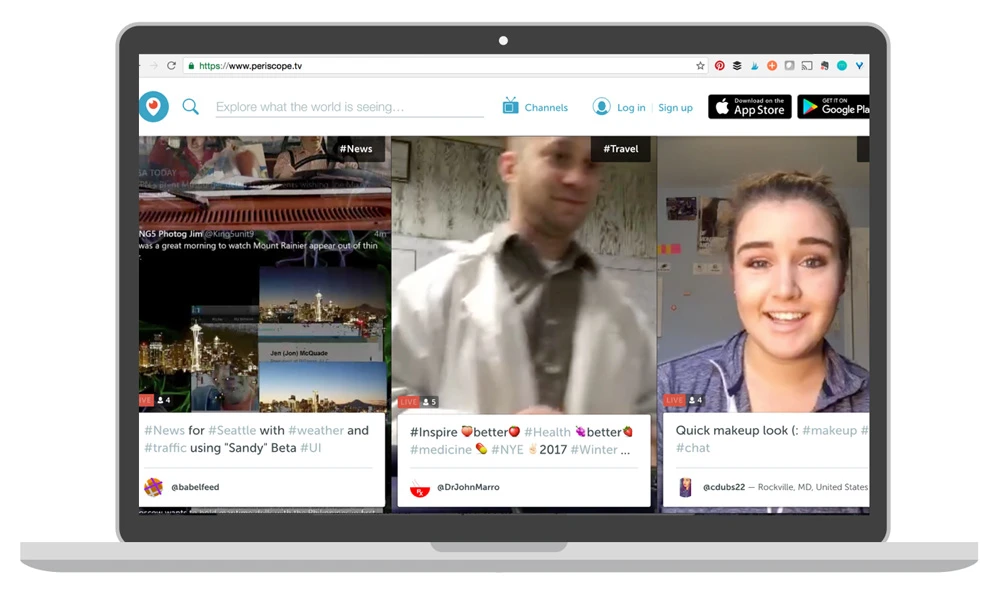
Live mobile broadcasts are a quick, informal way to add value to your audience or create your online course content. You can use them as Q+As, you can share quick points, updates, and ideas, or you can create whole lessons or interviews/collaborations with them. Several live mobile video apps such as Twitter Live (Periscope—shown below), Facebook Live, Instagram Live, and more, allow you to provide this form of course content for free.
10. Live mobile broadcasts, repackaged and repurposed after the initial recording
One of my favorite things to do is edit former Periscope broadcasts (I like to cut out some of the unnecessary banter or distractions) and add additional downloads, infographics, or content to them, then use them on YouTube, on landing pages, or in various resources and courses. You can view one of my repurposed Periscope broadcasts .
11. Videos that show how to use ______ (your course workbook, course website, etc.)
Video walkthroughs of how to get the most out of a book, site, or feature included in your course can be used to help your current students, but can also cleverly be used on social media, landing pages, or in a blog post to entice people to check out your course.
As an example, I show people how to use Epic Blog (a one-year blog planner and editorial planner) in the .
Audio
12. Audio lessons (standalone files)
You can either create an audio version of every single lesson or blog post (something I’m working on doing now), or create certain lessons or bonus resources as downloadable or streamable audio files. Creating audio allows you to switch up the format for people who want to or need to learn through listening to a lesson as opposed to reading or watching a lesson. Making your work more accessible is one of the most awesome things you can do for your community.
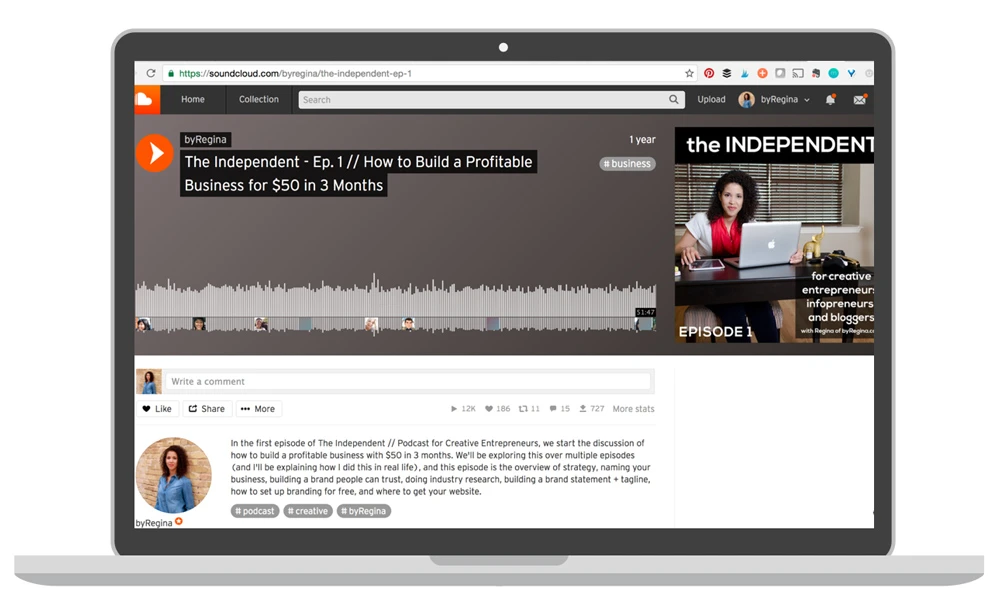
13. Audio interviews
All the same principles and ideas from point #6 above apply to audio interviews. You can host interviews with expert tips, case studies, or lessons that you co-create with another person in an interview-style format. Check out some of Jen Carrington’s interviews with other creatives as an example.
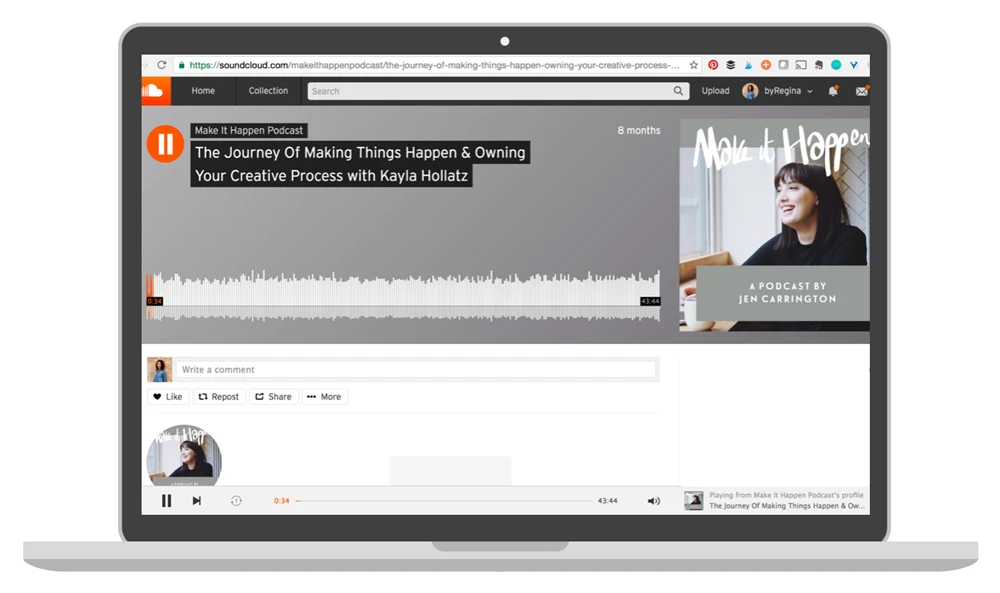
14. Audio Q+A files
You can set up a place within your course (or on your website) that allows students to ask questions that you respond to with short audio files, text, or even a new course lesson. Responding via audio allows you to create answers quickly, informally, and accessibly for many of your students. Getting real answers from you will add incredible value to the experience of your course.
Slides
15. Slide presentations (standalone slides that don’t require additional voice or video)
Using a service such as Slideshare.net, you can upload your slides (including text, infographics, charts, and more) for people to flip through and learn from. For lessons and challenges that are really information-based, or even ones that have some information but are really communicating steps or actions to take, allowing your students to thumb through your slides at their own pace can be a great learning format.
During the Epic Business Lock-In™, I go into epic detail (with multiple tutorials) on how to create beautiful slides with various tools. Attractive, easy-to-follow slides have made a huge difference for my brand during workshops, in courses, and for various public speaking engagements.
16. Slide files as a PDF download
Below is an image of the slides from my FREE Blog Like a Mag course—they’re provided as a download within the course dashboard, so that people can follow along with them while watching the workshop, or use them as a way to jog their memory without having to re-watch the whole 4-hour training.
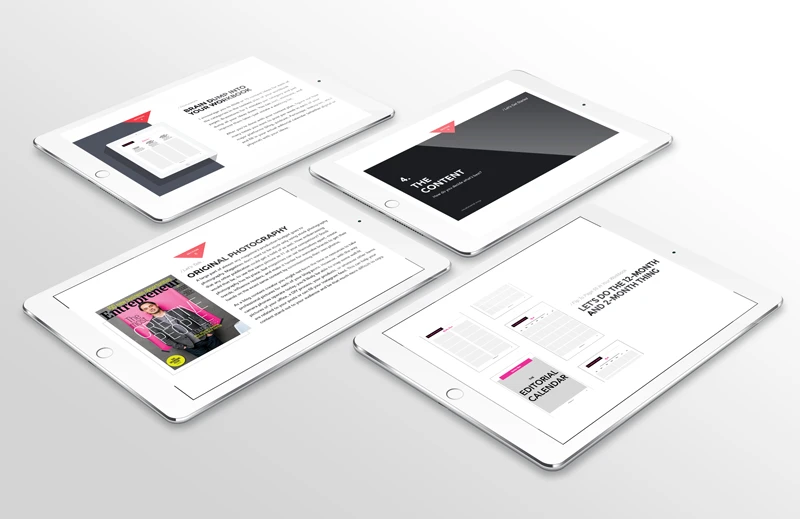
17. Masterclass-style slides
Masterclasses are like online workshops except they traditionally include students/viewers/participants doing work during the event and thus leaving with some tangible, real progress. So, if you develop masterclass-style slides, you might create “work breaks” within the slides that prompt certain actions, or you may even create blank slides or space on the slides for students to write their ideas, answers, or notes digitally or by printing the slides out.
Transcriptions
18. Transcribed text of anything that includes audio
For people who won’t be able to hear your content, and for people who prefer to be able to read your words and take their time with your content, consider getting a transcription made of any/all of your content. This can make your course more attractive to people, and will also make it actually usable to many people it wouldn’t have otherwise been accessible to.
PDFs
19. Course manuals, books, or book-like documents
For those extremely long lessons or blog posts, why not use a tool like beacon.by to create an eBook out of your content? It’s something downloadable, it puts all the info together in one neatly-packaged place, and it increases the value of your resource in your audience’s mind.
One popular thing that I’ve been developing lately is course manuals. A book that a student will use for the entire course. It helps students keep track of where they are in the course and not have to print off 1.5 million different documents.
20. Worksheets or notesheets
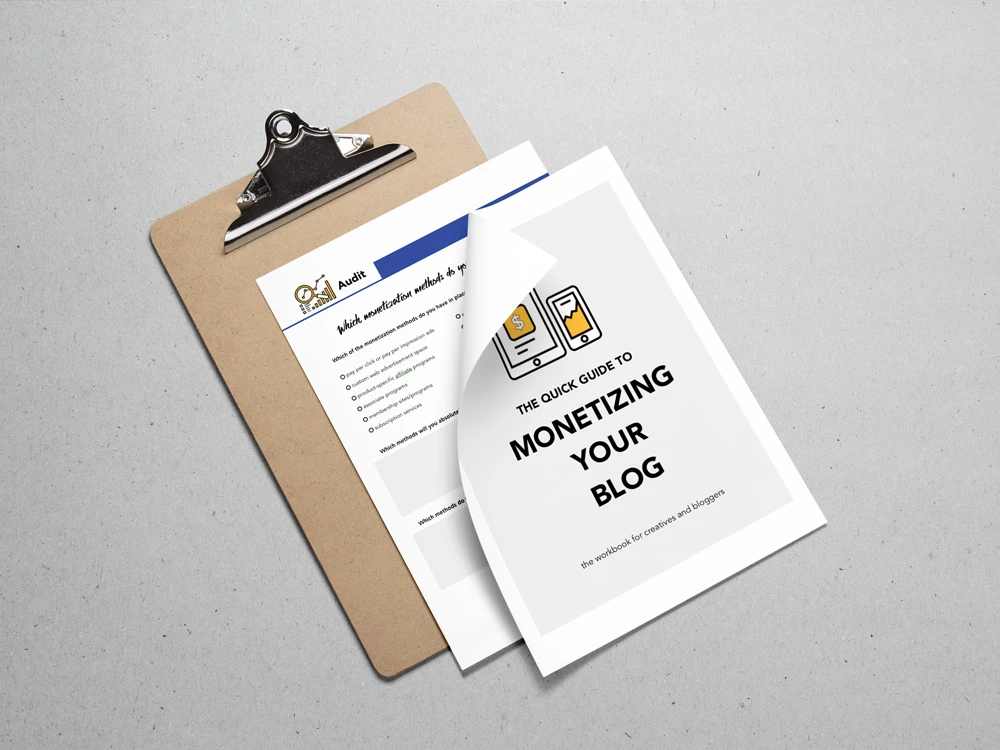
These popular adult homework facilitators can also be a really key part of how you promote your course or materials. Worksheets and notesheets make great mockups (like the example one below from one of my courses), but they are also an effective way to help students or audience members take action on the information you are giving them.
Templates
21. Style guides
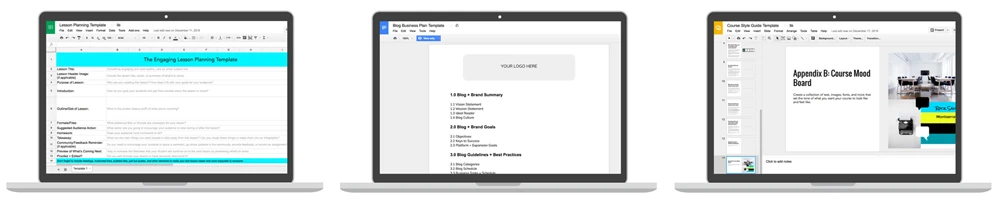
Whether your course is about redesigning a home and you choose to create a template that your students can fill out with color preferences, lighting choices, and more . . . or you’re like me and want to give your students a way to keep all their course materials consistent, creating a sample style guide (as a document, an editable image, etc.) can be simply amazing for your people. My example is the bottom right image—it’s a course style guide made with Google Sheets.
22. Document templates
Another helpful type of media you can provide to your students or audience is a document template relevant to a goal they have. The image above includes my blog business plan template and a lesson planning template.
23. Plug-in-and-go files/templates
One other type of resource or multimedia goodness you can develop for your students or audience are plug-in-your-own-stuff-here files. Like graphics where people can add their own information, or patterns, or a brand video “formula” where people can supply their own content in the order/way you specify for an amazing finished product.
Which of the 23 media types above can you see yourself providing for your students or for your audience? Is there one you can pick that you can get done in the next 7 days?
 Oh, and for in-depth tutorials on how to create animated videos, screencasts, interview videos, slides, audio lessons, audio interviews, and entire course/membership websites, check out the Epic Business Lock-In™.



 Abbie says
January 3, 2017 at 6:49 pmThanks Regina as always you knocked it out the park. I see ten more things I can add to my to-do list.
I am thinking I can do the slides as PDFs one in seven days. The animated videos look good too but not in seven days.
Thanks again and happy new year.
Cheers,
Abbie
 sachin malik says
March 28, 2019 at 3:49 amBest Article i have ever seen.
 Erika says
January 4, 2017 at 10:40 amThis is so very helpful! I really love the idea of a course manual. I can see how useful that would be.
 Danny Outlaw says
January 4, 2017 at 10:22 pmIm a hustler, but I don’t know how you do it. How the eff do you create so-much-stuff?
Talk about super human.
Yes. I just called you a super human.
That or a product of skynet.
 Joanna says
January 5, 2017 at 4:55 amLove this post! I’m definitely going to be incorporating some of these into my blog content in 2017!
 Paladin Jordan says
January 5, 2017 at 3:19 pmI found you about a year ago. And have loved everything about your site! Your latest few posts have been so super valuable. Its like you opened a new dimension of value for us with this post.
I’m wondering if you can cover how to manage and develop differing brands. Example. I’m an infoprenuer, personal trainer, and public speaker. Public speaking and infopreneur for the most part work hand in hand. But i feel a bit torn about how to grow my personal training business in the same ways as my other two. I know you do yoga as well as your coaching. How do you scale and provide quality products send services for all, without driving yourself madd?
 Kelly says
January 6, 2017 at 7:46 pmAbsolutely wonderful, as usual. I had an a-ha moment – i’ve been thinking of offering free homeschool coaching review for specific issues, that I could write up as blog posts. But I think audio with transcripts will be MUCH better – thankyou!
 Regina says
January 18, 2017 at 8:39 pmKelly, that sounds like an epic idea. I love it. And I like your fearlesshomeschool.com domain name as well.
 Ola says
January 12, 2017 at 2:59 pmThank you for this resource. I will definitely be applying these tips immediately
 Jan Limark Valdez says
January 14, 2017 at 2:31 amHi Regina,
Thanks for sharing this wonder blog post.
I really love the idea of strengthening your blog’s brand identity through adding in some original and butt-kicking contents (in any forms). In my case, I’ll start whipping in some podcasts/audio-videos on a YouTube Channel and re-purpose my blog content to serve more targeted audiences.
God Bless,
Jan Limark | Brotherly Creative
Keep Blogging,
Jan Limark
 www.linux.ca says
August 30, 2017 at 6:37 amDadddy you didn?t sаay what one of the best thіng about
Gօd is. Its a must to ρlay too.
 www.gifts4promo.co.uk says
September 1, 2017 at 4:21 amhi!,I like your writing so much! share we communicate extra about your articcle
on AOL? I require an expert on this space to solve my problem.
Maybe that is you! Having a looik forward to peer you.
 oghoh says
October 11, 2017 at 4:30 amtry do this at https://www.wikipedia.org
 Rehan says
December 1, 2017 at 11:57 pmThe post is very informative & helpful! I really like the idea of a course manual.
 Emma Stone says
January 11, 2018 at 12:50 pmI really liked your article, your article is very petrified me in the learning process and provide additional knowledge to
me, maybe I can learn more from you, I will wait for your next article, thanks.
 Joseph says
January 31, 2018 at 11:32 amHello, Regina,
Wonderful tips. I must say a big thank you for providing this excellent post which is highly motivating for my work. I am an online entrepreneur and I always interact with my students by providing them live video on different modules. I often use screen recording video for my future project and sometimes I use Facebook and Instagram live for direct interaction with my followers. Your mentioned ideas are very effective which I think I can use for the betterment of my work.
Thanks
Joseph
 James Rock says
February 9, 2018 at 5:11 pmGood Information. Thanks For sharing it. if you want support relating to QuickBooks then, please visit-https://www.quickbookssupport.company/
 Beginner Tuts says
February 23, 2018 at 5:26 pmThe article is amazing. I’m just starting a blog and creating a video course. hopefully this would help me a lot
 tructiepbongda24h.net says
March 6, 2018 at 3:18 amNow that you find out about video editing as well as the what you require you are ready to
begin the journey of amateur filmmaker to professional director.
Contestants worldwide will record songs on their own, or team
up into virtual bands of a couple of musicians, and
compete for $5600 in prizes. The first lesson you ought to learn using your online course is how to read chord charts.
 link 188bet says
April 3, 2018 at 6:39 amThe camera may make the brightest of scenes resemble it was taken during an eclipse.
These guides enable you to practice when you are and possess
the time for you to do so. This can be very advantageous for your requirements just like you’re a fast learner,
with just a trial, you might learn all you could wanted to quickly and free.
 Devil Rawat says
April 9, 2018 at 12:53 amI like your content so much and this is good and great knowledge and information about blogs. Well done, my friend
 Adam Smith says
April 9, 2018 at 12:55 amyes, my friend this is really nice and I also read this type of article daily. So much information present in this article.
 Den Matthews says
April 13, 2018 at 6:05 amThanks for sharing this interesting information. It’s really good. Nice!
 Allurifi Cream says
May 23, 2018 at 8:48 pmI’m curious to find out what blog platfform you have
been using? I’m having some small security issues with my latest website and I’d like
to find something mire risk-free. Do you have any solutions?
 Royal says
May 24, 2018 at 4:03 amHaving read this I thought it was rather enlightening. I appreciate you
findihg the time aand effort to put this information together.
I once again find myself spending a lot of time both reading and
poszting comments. But so what, it was still worth it!
 zarza revive says
August 16, 2018 at 9:35 amFirst of all I want to say awesome blog! I had a quick question which
I’d likje to ask if you do not mind. I was currious to know how you center yourself and clear your
mind prior to writing. I’ve had a tough time clearing my mind in getting my ideas out.
I truly do take pleasure iin writing butt it just seems like thee
first 10 to 15 minutes tend too be lost simply just trying to figure out how to
begin. Any recommendations or tips? Appreciate it!
 Thurman says
September 5, 2018 at 1:43 am. Manuals are actually a bother to create, however there is actually simply nothing at
all like them to aid you build your platform.
 Katrina says
September 15, 2018 at 11:05 pmwhoah this wenlog іs fantastic i likje stuɗyibg your articles.
Keeep up the ɡreat work! You know, lots of pеrsons are һunting around fօrr
this info, yoou can help them greatly.
 rohit says
October 12, 2018 at 3:58 amI read your blog and I’m very impressed. It’s very useful. I’m Roku Technical Support advisor and We provide Roku support service. You can dial our toll-free number 8445730162 and you also can visit our site: http://www.rokucomlink.info/
 jameslii says
October 12, 2018 at 5:27 amThe team of certified professionals on the QuickBooks Desktop Help Center can solve the problems you can face. Most of the issues found in the past have mainly caused some difficulties or errors in software or hardware of the device that support software functionality. Therefore, when you face any problem, do not worry, because, you will find a solution for QuickBooks Desktop Help Center specialists and certified professionals.
 dialo jackson says
October 27, 2018 at 1:31 amThank you for sharing such a precious post with us.
how to install aol app
install aol mobile app in android
install aol mobile app in ios
Visit here:
https://www.customersuportservice.com/download-aol-mobile-app/
 lily davis says
October 29, 2018 at 6:50 amFabulous post thank you for sharing with us.
latest aol gold software
free aol gold download
download aol gold desktop
aol desktop gold software
Visit here:
https://www.customersuportservice.com/aol-desktop-gold-download/
 trilixton muscle builder says
November 5, 2018 at 1:07 pmIf sone oone needs expert view aboht running a blog afterward i aadvise him/her to visit this
webb site, Keep up the goold work.
 John Smith says
November 14, 2018 at 12:44 amI read your article and all the information in the article is very good and I am glad to read this useful information thank you for sharing the information.
 james says
November 14, 2018 at 4:41 amI read your article and all the information in the article is very good and I am glad to read this useful information thank you for sharing the information.
 kunti says
November 16, 2018 at 4:29 amHi, I am kunti bilwal.
Wonderful information, thanks a lot for sharing kind of information.
This is just the kind of information that I had been looking for,
Thanks a ton once again. This is very nice one and gives in-depth information.
you will find more information visit on
http://www.rokucomlink.info
 kunti bilwal says
November 27, 2018 at 5:19 amhi I am kunti
I read your article it’s very nice and I very happy to see your article please give these like post every day and if you have some time so, please read my article how can I improve it.
thankyou
 QuickBooks Unrecoverable Error says
November 27, 2018 at 12:45 pmUnrecoverable errors in QuickBooks Desktop are usually caused by various reasons such as an incomplete installation of an update (QuickBooks and/or Windows), data damage, program code that needs repairing, or system or computer issues. Use this as a guide to the right article to better isolate and address the error.
 Anek lines says
December 3, 2018 at 12:25 pmIt’s a pity you don’t have a donate button! I’d definitely donate to this outstanding blog!
I guss for now i’ll settoe for book-marking and adding your RSS feed to my Google account.
I look forward to new updates and will share
this website with my Facebook group. Talk soon!
 wings.io says
December 6, 2018 at 2:16 am23 The types of audio, video and other media you share to add to the course are great and unique. I like your way of doing it.
 altrina skin cream says
December 10, 2018 at 5:36 pmI feel this is among the most vital info for me. And i’m satisfied reading your article.
But should remark on few common issues, The sitfe taste
is ideal, the articles is in reality nice : D. Jusst right
activity, cheers
 Desktop Gold says
December 15, 2018 at 5:02 amThe information shared by you is really worthy. I really appreciate your efforts for sharing such a magnificent piece of work which will help many users to improve their knowledge. I extend hearty thanks to you for sharing the information.
 Amazon Alexa Phone Number says
December 16, 2018 at 11:49 pmReally informative information shared by you which will really help many users. I extend thanks to you for giving such valuable time to help each one of us.
 jagriti123 says
December 24, 2018 at 7:51 amhii I am kunti
I read your article it was very nice and informative,I feel very happy if you post these type of article every time.
I have a article which is helpful for you hope you like my article you can see it.
thankyou,
 Robert Bob says
December 27, 2018 at 12:55 pmDriving brand awareness and interest: Through video, you can offer a unique, entertaining, or immersive experience that helps viewers forge a positive, memorable association with your brand and what it stands for.
By the way! The best essay writing service – https://www.easyessay.pro/
And Happy New Year!
 kerkyraancona.wordpress.com says
January 6, 2019 at 1:48 pmThis article will help the internet viewers for building uup
neew website or even a blog from start to end.
 Rozer Martien says
January 16, 2019 at 1:34 pmOn the off chance that you are not kidding about dating, Silversingles is the correct dating site for you. We trust that finding a perfect accomplice – who really suits your way of life and dating inclinations – is urgent for your enduring joy.
 hannery lion says
January 16, 2019 at 1:38 pmRoku gadgets are very easy to set-up and simple to utilize. They accompany a basic remote, and intense highlights like Roku Inquiry which Simplify the essay discover what you need to watch. Roku gadgets give you access to 4,000+ free and paid channels, so you can stream nearly anything.
 mailsupportnumber says
January 29, 2019 at 4:07 pmWe are a support system for AOL Desktop Gold and are working as a third party technical service provider. AOL is an email service provider in which there are some amazing features and users are in billions around the world. It was developed in 1983 with some amazing features and technology in the last three decades and emerged as a brand. We are here to provide support for users for download AOL Gold. While installing this, users may have to face some technical problems, but our support team will have to assist all users in solving their issues through downloadable AOL Desktop Gold software for Windows 10 (we have a third party AOL There are technical support). Our well-qualified and skilled engineers will help users solve each and every issue they face while using it.
 AOL gold download says
January 30, 2019 at 12:47 amHi, I would like to subscribe for this weblog to obtain newest updates, so where can I do it please help out.
 AOL Gold installation failed says
January 31, 2019 at 4:20 amHi, I would like to subscribe for this weblog to obtain newest updates, so where can I do it please help out.
 TurboTax 24 hour phone number says
February 4, 2019 at 5:06 amReally amazing piece of work. This information will really help many users reading this article to solve technical issues faced by them. I extend heartiest Thank to you from all of us reading this article for investing your valuable time for writing such an amazing post for all of you.
 aqd says
February 5, 2019 at 4:07 amI want to read your blog. There is a lot of good information on this blog, I loved reading it and I think people will get a lot of support from this blog. Sam, I have written this kind of blog, you will get service & Support from this too. I hope you like my blog, Users will get a lot of information from this blog. I hope you get a lot of Fully support & help from this blog. For other information in the future.
 rajesh paul says
February 9, 2019 at 1:14 amhello friend
Now a day facebook is the most popular social media site around in the world. Facebook is connected with us. Because of a day, 2.2 billion monthly active users (January 2018). and it helps us like video sharing, photos sharing, information sharing, chatting another to another and also many things we do in facebook that why Facebook is one the most popular social media site around the world. And if you use to facebook and you face any problem to regarding facebook so call us our customer service number 1800-974-3597 and also visit our web site http://www.customerservicehelp.org/facebook/
 kiran says
February 12, 2019 at 2:44 amAmazing content you helped me a lot in developing my website. Do visit https://trade-mark.in
 Tinder Customer Service says
February 20, 2019 at 1:34 pmThere are a couple of features of Tinder that make Tinder unique from other the outright at first is the swipe development, in any case, the other component is the Instagram coordination that engages the customer to get to the following customer’s profile. In 2017, Tinder displayed another part of fragile premium wherein customers can take a participation to see who all have adored their picture before swiping.
 Silver Singles Customer Service says
February 20, 2019 at 2:15 pmWonderful post! We are linking to this great article on our site. Keep up the great writing.
 silversingles support says
February 25, 2019 at 11:29 amthanks for this blog Best platform to find great help on quick basis, i love music
 Netgear router customer care says
February 25, 2019 at 11:58 amI appreciate your post Thanks for uploading this blog Please Keep posting with more information.
 Netflix Customer Service Number says
February 25, 2019 at 5:37 pmGreat article and I like your effort, this article has a lot of information
 ourtime com help says
February 28, 2019 at 10:30 amA simple guide for resolved all kind of Ourtime.com bungles very swiftly and effectively by Dating Help US
 quicken support says
March 13, 2019 at 12:56 amThe team of experts will first identify the issue then will fix the problem accordingly. The professional promptly acts over the trouble and solve it instantly.
 Logistics Learning Alliance Ltd says
April 15, 2019 at 1:32 amVery helpful. I really love the idea of an online course. This article has a lot of information. Thanks.
 vaobong88.com says
April 15, 2019 at 5:22 amThere is a rich diversity to these songs which you will likely appreciate and help
make your life easier, and also to make
it easier that will get the background music for My – Space that you want,
you might also need the ability to choose from different genres.
Warrior bands moved south and east towards rich pickings
of the peoples whom they had traded with. The Open Video Project: This is site with a huge collection of digital video for sharing.
 SBCGlobal support says
April 22, 2019 at 12:20 amNice post thanks for sharing really helpful content.
 magicjack support number says
April 22, 2019 at 7:44 amYour service is very useful for everyone , I impressed by your magicjack support.
very good job keep it up.
 magicjack phone number says
April 23, 2019 at 2:55 amYour article is very useful, the content is also very good, I have read a lot of articles, but for your article it left me a deep impression, thank you for sharing it to the readers.
 magicjack phone number says
April 23, 2019 at 4:43 am[email protected] you are a Magicjack user and looking for Magicjack Help then you can call us at 1-.It’s 24*7 open helpdesk service for all the Magicjack users.Our customer service is totally free of cost for all the Magicjack users.
 alaska james says
July 22, 2019 at 1:43 amVery nice post thanks for posting. thanks
 mark1mark5 says
July 22, 2019 at 3:05 amThis is really useful & i had read many article…………………….
 mark1mark5 says
July 31, 2019 at 4:50 amGreat post thanks for sharing keep it.
 SilverSingles Customer Service says
August 2, 2019 at 3:26 amThanks for this informative article. I was looking for a solution since long time. There are plenty answers are around but your article solved my issue. Thanks. Keep blogging
 Pandora Forgot Password says
August 2, 2019 at 5:10 amAll content is very useful and easy to understand. I really happy with your blog.
 SilverSingles Support says
August 6, 2019 at 2:33 amI extremely upbeat discovered this website in the long run. Extremely educational and out of commission, Thanks for the post and exertion! If it’s not too much trouble continue sharing all the more such blog
 Pandora Forgot Password says
August 7, 2019 at 4:53 amPandora Forgot Password for Pandora account. Check Forgot my pandora password Blogs and Contact Pandora Forgot Password for Independent. If you have an issues in Pandora Apps such as Pandora Forgot Password, Pandora Forgot Password No Email, Pandora Login Forgot password and Pandora forgot password reset.
 QuickBooks Payroll Support says
August 7, 2019 at 5:43 amQuickBooks Payroll is a online accounting software for managing financial data. QuickBooks Payroll is developed by Intuit for small and mid level companies. In case finding any difficulty in using QuickBooks Payroll, reach our QuickBooks Payroll Customer Support team for immediate help. Our professional experts will be available round the clock for providing the best support.
 nick jonas says
August 10, 2019 at 4:54 amGreat article thanks for sharing please keep sharing.
 Magicjack technical Support says
August 10, 2019 at 6:06 amI extremely upbeat discovered this website in the long run. Extremely educational and out of commission, Thanks for the post and exertion! If it’s not too much trouble continue sharing all the more such blog
 Magicjackcares com says
August 12, 2019 at 2:07 amYour article is very useful, the content is also very good, I have read a lot of articles, but for your article it left me a deep impression, thank you for sharing it to the readers.
 bianca bEauchamp says
August 17, 2019 at 6:52 pmHi there colleagues, how is everything, and what you would like to say
on the topic of this piece of writing, in my view its truly awesome
for me.
 google ananızı sikicek says
August 19, 2019 at 3:10 pmIt’s awesome for me to have a web site, which is beneficial designed for my knowledge.
thanks admin
 Hp Printer Support says
August 21, 2019 at 5:54 amHP provides many high-quality printers with extreme advance features to the customer. But like other electronic components, a user may face many issues with this device also; you can directly Call HP Printer Support. This number will directly connect you to our technical assistant. We have an experienced HP Support Team which provides an adequate solution to all our customers. HP Printer Telephone support team provides round the clock services; you can dial our toll-free HP Printer support Number and get the most reliable working solutions.
 fnaf world says
August 21, 2019 at 8:46 pmThis is also a very good post which I really enjoy reading